

















 Shop
Shop


Find Shinies, Hundos, Raids, and Gyms, all in AnyTo. Instantly teleport to any spot with just one tap, anytime, anywhere!
A Pokémon GO scanner used to be a tool or website that scanned your local area to show nearby Pokémon spawns. You could filter the results to display only 100 IV or rare Pokémon. But in 2026, scanners have evolved far beyond that. Today's scanners can help you track shiny Pokémon, locate active raids, and even find gyms or PokéStops.
In this guide, I'll show you the best tools for every scanning purpose, and introduce an incredible companion app that takes your Pokémon GO experience to the next level.

Quick Navigation

Top 2 Pokémon GO Shiny Scanners
A shiny scanner, often included in Pokémon GO mods, automatically checks every Pokémon spawn around you to see if it's shiny. However, there's a catch.
There is a limit of 10,000 encounters per day in Pokémon GO. Since a scanner technically "encounters" each spawn it scans, overusing it can trigger BSOD (Blue screen of death). Use them smartly to avoid detection.

Scanner #1 PGSharp—Android Mod with Shiny Scanner
PGSharp is one of the most popular Android mods for Pokémon GO. The shiny scanner built into PGSharp lets you instantly identify shiny Pokémon without having to tap or encounter them manually. This makes shiny hunting faster and more efficient, though, as a modded app, it carries a risk of soft bans if used excessively.

Scanner #2 iPoGo—Android & iOS Mod with Shiny Scanner
iPoGo is a mod that works on both Android and iOS, often seen as the modern successor to iSpoofer. It's packed with advanced spoofing and automation tools, including a shiny scanner for Pokémon GO. It automatically detects shinies near you as you walk or teleport and sends you notifications.

Top 2 Pokémon GO Raid Scanners
Pokémon GO raid scanners make it easy to spot ongoing raids nearby or around the world. Most map tools let you filter by tier, boss, or region, while raid finder apps coordinate raids worldwide and allow you to join them remotely.
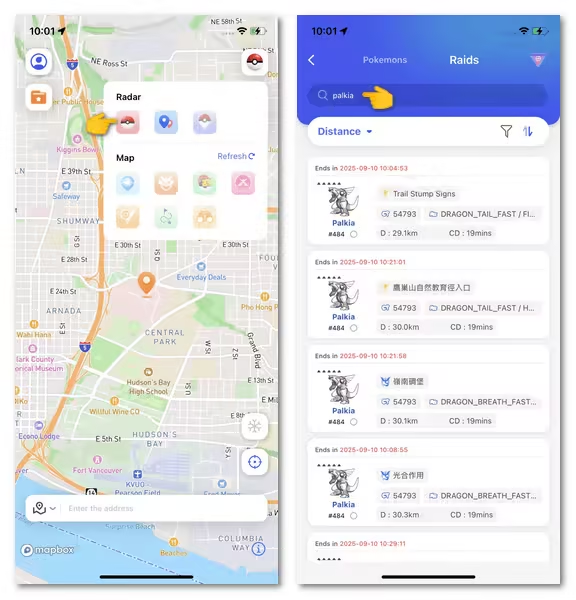
Scanner #1 iMyFone AnyTo—Pokémon GO Raid Scanner App
iMyFone AnyTo is a full-featured Pokémon GO scanner app that lets you find and join raids anywhere in the world. You can filter raids by distance, tier, or specific Raid Boss, then teleport to that location instantly without needing a remote raid invitation and a Pass. If you want to raid late at night, just jump to Tokyo, New Zealand, or any active region's time zone.
Scanner #2 PoGo Map—Pokémon GO Raid Tracker Website
PoGo Map is a simple but powerful web-based Pokémon GO tracker that helps you spot active raids in your local area or across the globe. You can filter raids by level, and it also shows which Raid Bosses are currently available for the month. It's completely free, lightweight, and accessible on any browser.

Top 2 Gym Scanners for Pokémon GO
Pokémon GO Gym Scanners show real-time information about Gyms and the Pokémon within them. Some even show which team controls the Gym. They're also useful for finding active raids.
Scanner #1 iMyFone AnyTo—Gym Scanner for Pokémon GO
iMyFone AnyTo also includes an interactive Gym map showing team colors and control status, along with a PokéStop map to check nearby stops for farming items or completing research tasks. Best of all, every point supports one-tap teleportation. You can use it on the app version as well as on the PC version.

Scanner #2 PokéMap — Gym Map Website for Pokémon GO
PokéMap is a community-driven, interactive Pokémon GO map website. You can search for specific Pokémon and see their spawn points in real time. Simply zoom in on your location or any city, and you'll see Gyms, Pokémon spawns, PokéStops pinned on the map.

Can You Get Banned for Using Pokémon GO Scanner?
Yes, depending on the tool and how you use it. Pokémon GO's ToS strictly forbid third-party apps that interact with the game in unauthorized ways. For example, the game limits how many Pokémon you can encounter each day.
- Safe methods: Community-based maps, user-submitted scanners, or apps that do not inject code into Pokémon GO.
- Risky methods: API scraping, botting, or GPS spoofing without protection.
AnyTo, for example, offers anti-detection features like realistic movement,cooldown reminder, and Bluetooth connection method to reduce ban risks. As always, proceed with caution and follow updated community guidelines.
Bonus Tip: Best Companion App for Pokémon GO Scanners
If you're using a Pokémon GO scanner, pairing it with a reliable Pokémon GO spoofer can make your gameplay much smoother. iMyFone AnyTo is the perfect companion app for both iOS and Android players. It's not a modded app but a legit location changer that works with the official Pokémon GO, so there's no need to worry about bans or crashes.


AnyTo's Key Features
- Instantly change your GPS location anywhere in the world to catch Pokémon, join raids, or visit PokéStops without moving an inch.
- Built-in Pokémon GO scanner to filter Pokémon by IV, Gyms, and PokéStops around your fake location right on the in-app map.
- One tap is all it takes to jump to any coordinates. Perfect for hunting rare Pokémon or joining distant raids.
- Works through Bluetooth connection instead of mods or root/jailbreak, lowering ban risk dramatically.
- Auto-catch Pokémon and spin PokéStops hands-free.
- Plan and automate walking routes between PokéStops, Gyms, and spawn points to maximize gameplay efficiency.
How to use AnyTo to scan 100 IV Pokémon
Step 1. Open AnyTo on your computer and connect your device.

Step 2. Open PoGo Search, enter the info of your wanted Pokémon according to the format. Click "Go" and teleport to the spawn.

Step 3. You can also turn on the "iv100" button to filter hundos.

FAQs about Pokémon GO Scanner
1.What is a Pokémon GO Hundo Scanner?
A Hundo Scanner helps players locate 100% IV (a.k.a. “hundo”) Pokémon by scanning community-reported spawns or raid bosses. Tools like AnyTo, Discord bots, and apps like WeCatch can alert you when a potential hundo is nearby.
2.What is the best Pokémon GO scanner in 2025?
AnyTo's PoGo Scanner is among the best in 2025, offering a safe, real-time map of rare Pokémon, Gyms, and PokeStops worldwide without risking a ban.
3.How do I find local Pokémon using a scanner?
Use scanners like WeCatch or Discord bots linked to your local area to receive alerts about nearby rare Pokémon, raids, or IV-perfect spawns.
4.Does Pokémon GO have an official scanner?
No, Niantic does not provide an official Pokémon scanner. However, they encourage players to explore and collaborate locally, which some community tools facilitate.
5.Can I use a scanner on iOS and Android?
Yes, some scanners like iMyFone AnyTo are available on both platforms, while others are web-based or integrated through community platforms like Discord or Telegram.
6.How do I set up a Discord scanner for Pokémon GO?
You need to join a local Discord server with scanning bots like PokeNav or PokeAlarm. Admins typically configure bots to alert users about spawns, raids, and more.
Conclusion
Whether you're chasing shiny Pokémon, looking to join rare raids, or completing your Pokedex, using a Pokémon GO scanner can significantly boost your efficiency. Tools like Pokémon GO spoofer AnyTo and PokeHunter offer unique ways to enhance your gameplay—just remember to use them wisely and responsibly. Happy hunting!


Spencer Hill has over 5 years of experience specializing in mobile screen mirroring and virtual location modification. As a senior editor at iMyFone, he creates user-friendly tutorials that help mobile users maximize their device functionality.
-
Jurassic World Alive Hacks 2026: Cheats That Still Work
What does Jurassic World Alive hack mean? What are the available Jurassic World Alive cheats in 2026? Can you actually cheat in JW Alive? Find the answers here!
7 mins read -
Forever Friends & Remote Trades: What You Need to Know
Find out how Forever Friends and Remote Trades work in Pokemon GO, how to become Forever Friends, and how this new feature affects everyone.
9 mins read -
AnyTo Plus – Safely Change iPhone Location Using Android (No Jailbreak Needed)
AnyTo Plus is a location changer that lets you spoof your iPhone GPS using an Android phone. Works with official Pokémon GO and MHN – no jailbreak required.
8 mins read -
Hyper Training Guide: Best Pokémon for Silver Bottle Caps in Pokémon GO
How does Silver Bottle Cap work in Pokémon GO? Which Pokémon should you use the Silver Bottle Cap on? Check out this ultimate Hyper Training guide!
8 mins read -
Pokémon GO Urban vs Rural Challenges: Tips for Rural Players
This article explore Pokémon GO's urban vs rural challenges, Niantic's needed fixes, and smart tips to help rural trainers level up their experience.
7 mins read -
How to Get Unown in Pokemon GO? [2026 Ultimate Guide]
Discover how to get Unown in Pokemon GO! Learn Unown shiny rates, spawn tips, full alphabet list, and the 5 best ways to find this ultra-rare Pokemon in 2026.
8 mins read
Was this page helpful?
Thanks for your rating
Rated successfully!
You have already rated this article, please do not repeat scoring!