
















 Shop
Shop


If your iPhone keeps freezing and crashing after iOS 27, separate app-level crashes from whole-system freezes first. A single bad app, low storage, overheating, and background indexing need different fixes from a failed update or damaged iOS installation.
This guide walks through the practical order: quick checks, iOS repair, restore options, and prevention steps so you do not jump straight to erasing the iPhone.

In this article:


Quick answer
For iPhone freezing after update, start with storage, heat, app updates, and a force restart. If the whole system keeps freezing, crashes during startup, or fails after an update, an iOS repair workflow such as Fixppo is more relevant than deleting random apps one by one.
Why Does My iPhone Keep Freezing and Crashing?
- Low storage: iOS needs working space for updates, indexing, app cache, and system logs.
- Post-update indexing: After a major iOS install, temporary slowdowns can happen while the phone rebuilds search and photo indexes.
- Buggy apps: One app can crash repeatedly without meaning the whole iPhone is broken.
- Heat or battery issues: Overheating and aging batteries can make the system throttle, freeze, or shut down.
- iOS corruption: A failed iOS 27 update, restore, or firmware conflict can make the whole device unstable.
Advanced Fixes for iPhone Freezing
1 Force Restart iPhone
Force restart when the screen is frozen, touch does not respond, or apps will not close. It does not erase data and is the right first step for a temporary freeze.
2 Repair iOS with Fixppo
When the iPhone keeps freezing across multiple apps, crashes soon after startup, or became unstable after an iOS 27 update, iMyFone Fixppo is a stronger fit than ordinary app cleanup. It focuses on the iOS layer behind system-wide freezes.

Fixppo for iPhone Freezing and Crashing:
- System-Level Repair: Built for update failure, crash loops, stuck Apple logo, black screen, recovery mode, and repeated freezes.
- Lower Data Risk First: Standard Mode is the preferred starting point when the iPhone is detected and you want to avoid immediate erase-based restore.
- Guided Firmware Handling: Helps download firmware for the detected device instead of relying on a manual file.
- Highest Success Rate: Ensures to fix iPhone screen keeps freezing issues with 99% success rate.
- Support for All iOS Versions: For iPhone models running iOS 27 or earlier, this software is sure to help.
Step 1: Install Fixppo, connect the iPhone with a reliable USB cable, and choose Apple System Repair.

Step 2: Choose Standard Mode when the device can be detected and the issue looks like an iOS software problem.

Step 3: Download the firmware shown for your exact model, then start the repair and keep the cable connected until the iPhone restarts.
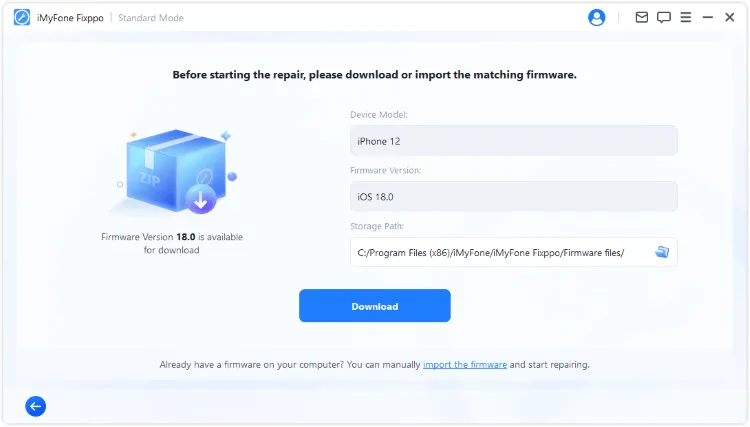
3 Restore iPhone in DFU Mode
DFU restore is a deeper erase-based option for serious firmware failure. Use it only after backing up what you can and after simpler repair paths fail.
Step 1: Launch iTunes and connect your crashing iPhone to the computer.
Step 2: For iPhone 17/16/15/14/13/12/11/X/8 to enter DFU mode, quickly press the Volume Up and Volume Down buttons, then press and hold the Power button until the iPhone screen turns black; At this time, press and hold the Volume Down button for about 5 seconds, release the Power and continue to press and hold the Volume Down button until iTunes detects that iPhone has entered DFU mode.
For other iPhone models to enter DFU mode, you can watch this video for more details.

Step 3: When iTunes pops up this window, click Restore to fix your iPhone.

Step 4: Wait for iTunes to complete its progress bar and restart the iPhone, which indicates that the problem of iPhone keeps freezing up after update has been resolved. If the device exits DFU mode abruptly, you will need to perform steps 2 and 3 again.
Basic Fixes for App Crashes and Random Freezes
1 Check iPhone Storage
It's possible that your iPhone freezes randomly due to full storage. Open Settings and free space if storage is nearly full. Remove large videos, offline media, and unused apps, then restart the iPhone.

Fix iPhone Keeps Freezing
If freeing up the iPhone storage doesn't work, or you can't even access your device, Fixppo can stop your iPhone from random crashing and restore your device to its normal state without deleting anything.
2 Stop Heavy Background Activity
After an iOS 27 update, give the iPhone time on Wi-Fi and power. If it remains hot for hours, close heavy apps, pause large downloads, and check battery usage.

3 Remove Faulty Apps
If the crash happens only in one app, update it, clear its cache if possible, or reinstall it. This is faster than repairing the whole system.
4 Update Apps and iOS
Install app updates and the latest available iOS patch for your update channel. Avoid installing beta software on your main iPhone if you cannot tolerate instability.
Conclusion
iPhone freezing can come from storage, apps, heat, or iOS itself. Work from the least disruptive fix to the deepest repair. If freezes started after iOS 27 and affect the whole phone, iMyFone Fixppo is a practical system repair path before DFU restore or a full erase.


Melvin Cooper has over 10 years of experience in the technology industry and is an expert at providing tips and handy solutions to Apple and Android users. Dedicated to helping millions of users improve their experience with mobile devices, he has maintained an impressive record of solving problems.
-
Fix iPhone Stuck on Update Requested [iOS 27 Supported]
iPhone stuck on update requested? Learn why it happens and discover 8 proven solutions to get your iOS update back on normal without data loss.
3 mins read -
[2025 New] How to Stop iOS 17/18/26 Update in Progress?
How to stop iOS 17/18/26 update in progress when you feel like staying in the current iOS version? Here's how to do it via 4 methods.
3 mins read -
5 Ways for iOS 26 Beta Download [Developer & Public Beta]
How to get iOS 26 beta? Whether you want to download iOS 26 developer or public beta, you can find the suitable methods with our guide. 5 Ways here!
3 mins read -
17 Important Facebook Statistics You Should Know in 2025
Do you want to know some up-to-date Facebook statistics? We break down 17 must-know Facebook stats about demographics, engagement rate and more.
3 mins read -
[2025 Full Guide] All About iOS Update Issues and Solutions
Have you encountered different problems during or after iOS update? This article focuses on all iOS update issues and solutions. Hope you can learn from it.
5 mins read -
[Full Guide] 50+ iOS 18 Bugs and Fixes You Should Know 2025
What are some known iOS 18 bugs? Read on this article to learn everything about iOS 18 bugs and fixes.
5 mins read
Was this page helpful?
Thanks for your rating
Rated successfully!
You have already rated this article, please do not repeat scoring!