Shop
Shop
MT 文章样式
Category: article-template

7 mins read
顶部广告位系列

目录系列
Content:
- How to Screen Mirror iPhone to PC Wired or Wirelessly
- 1. iMyFone MirrorTo [Best pick — smooth, with audio sync & game control]

- 2. LonelyScreen [Basic AirPlay, no audio/control
- 3. AirServer [Good for schools, setup is tricky]
- 4. Reflector 4 [Solid mirroring, not built for gaming]
- 5. ApowerMirror [Feature-rich, but limited free version]
- 6. Vysor [Android-focused, weak iOS support]
- FAQs About iPhone Screen Mirroring to PC
- Conclusion
带有盒样式的标题:Try to Recover iPhone Data without Backup
H3标题:Try to Recover iPhone Data without Backup
标题居中:Try to Recover iPhone Data
标题右对齐:Try to Recover iPhone
1 Try to Recover iPhone Data without Backup
1 Try to Recover iPhone Data without Backup
1 Try to Recover iPhone Data without Backup
1 Try to Recover iPhone Data without Backup Try to Recover iPhone Data without Backup
Tips 1 Try to Recover iPhone Data without Backup
2 Try to Recover iPhone Data without Backup
3 Try to Recover iPhone Data without Backup
01 Try to Recover iPhone Data without Backup Try to Recover iPhone Data without Backup
H4标题:Try to Recover iPhone Data without Backup
高亮标题:Try to Recover iPhone Data without Backup
高亮标题内容:Try to Recover iPhone Data without Backup
iOS 18 釋出時間
具體步驟
列表系列
希望使用ul li列表黑色点点对齐,可在ul标签上添加(class ="alignment")
- Download and Install AirServer: Visit the AirServer website, download, and install the application on your Windows PC.
- Launch AirServer: Open the AirServer application on your PC.
- Connect Your Device: On your iOS device, open Control Center, select "Screen Mirroring" or "AirPlay," and choose your Windows PC from the list.
- Start Mirroring: Your iOS device's screen will start mirroring on your PC.
文字系列
加粗: 字体加粗
高亮文字:Try to Recover iPhone Data without Backup
Try to Recover iPhone Data without Backup
Try to Recover iPhone Data without Backup
带有背景色的高亮:Try to Recover iPhone Data without Backup
带有背景色的高亮:Try to Recover iPhone Data without Backup
补充说明类的文本框收起效果
いくつかの主な機能は下記の通りです。
iPhone / iPadのGPS位置を世界中の隅々まで簡単に偽装できます。
導入した動画を下部の動画編集バーにドラッグして編集が可能になります。編集バーで動画を
补充说明类的文本框展开效果(collapse-text类名后加了closed类名就是默认收起)
Apple Musicの起動時や使用中は、以下の問題が発生する場合があります。
- Apple Musicの音楽がiTunesで同期できない。
- サインイン / ログインできない。
- 曲がダウンロード / 再生できない。
- アプリがすぐ落ちて使えない・起動できない。
- アプリが勝手に起動する。
- ミュージックライブラリが読み込み中のままブリーズする。
- 「iTunes Storeに接続できません」とエラーを表示する。
- 予期しない問題が発生、「エラーコード4010」が出る。
- iOSアップデート後、Apple Musicライブラリーが空になった。
视频样式
Watch Video Tutorial to AirPlay iPhone on Windows PC:

Here is an official registration code for you with a 10% OFF discount.
Get 10% OFF with Coupon Code: YTR5E7 (Valid for 3 days)
对比
Pros

- Supports to recover deleted/lost videos, photos, contacts, messages, WhatsApp/Kik/WeChat/Viber messages and more files from iDevice;
- Allows you to preview and selectively extract data from iTunes or iCloud backup files;
- Compatible with various iOS devices, such as iPhone 11/XS/XR/X/8/7/6s/6/5s/5C, iPhone SE, iPad Pro, iPod touch running iOS 13/12/11/10/9/8/7;
Cons

- Supports to recover deleted/lost videos, photos, contacts, messages, WhatsApp/Kik/WeChat/Viber messages and more files from iDevice;
- Allows you to preview and selectively extract data from iTunes or iCl oud backup files;
- Compatible with various iOS devices, such as iPhone 11/XS/XR/X/8/7/6s/6/5s/5C, iPhone SE, iPad Pro, iPod touch running iOS 13/12/11/10/9/8/7;
Pros
- Supports to recover deleted/lost videos, photos, contacts, messages, WhatsApp/Kik/WeChat/Viber messages and more files from iDevice;
- Allows you to preview and selectively extract data from iTunes or iCloud backup files;
- Compatible with various iOS devices, such as iPhone 11/XS/XR/X/8/7/6s/6/5s/5C, iPhone SE, iPad Pro, iPod touch running iOS 13/12/11/10/9/8/7;
Cons
- Supports to recover deleted/lost videos, photos, contacts, messages, WhatsApp/Kik/WeChat/Viber messages and more files from iDevice;
- Allows you to preview and selectively extract data from iTunes or iCl oud backup files;
- Compatible with various iOS devices, such as iPhone 11/XS/XR/X/8/7/6s/6/5s/5C, iPhone SE, iPad Pro, iPod touch running iOS 13/12/11/10/9/8/7;
Pros
- Supports to recover deleted/lost videos, photos, contacts, messages, WhatsApp/Kik/WeChat/Viber messages and more files from iDevice;
- Allows you to preview and selectively extract data from iTunes or iCloud backup files;
- Compatible with various iOS devices, such as iPhone 11/XS/XR/X/8/7/6s/6/5s/5C, iPhone SE, iPad Pro, iPod touch running iOS 13/12/11/10/9/8/7;
Cons
- Supports to recover deleted/lost videos
- Allows you to preview and selectively
- Compatible with various iOS devices

Question
“My iPhone running iOS 14 stopped responding after updating a few apps. To get it to work again, I decided to factory reset the device. As a result, however, all my data on the device was gone! I'm so anxious now but I don't know what to do. Can anyone help me get my data back?”

Note
“My iPhone running iOS 14 stopped responding after updating a few apps. To get it to work again, I decided to factory reset the device. As a result, however, all my data on the device was gone! I'm so anxious now but I don't know what to do. Can anyone help me get my data back?”

Tips
“My iPhone running iOS 14 stopped responding after updating a few apps. To get it to work again, I decided to factory reset the device. As a result, however, all my data on the device was gone! I'm so anxious now but I don't know what to do. Can anyone help me get my data back?”

Note
“My iPhone running iOS 14 stopped responding after updating a few apps. To get it to work again, I decided to factory reset the device. As a result, however, all my data on the device was gone! I'm so anxious now but I don't know what to do. Can anyone help me get my data back?”
- Recover lost or deleted files, photos, audio, music, emails from any storage device effectively
- lost or deleted files, photos, audio, music, emails from any storage device effectively,
- Recover lost or deleted files, photos, audio, music, emails from any storage device effectively,
- Recover lost or deleted files, photos, audio, music, emails from any storage device effectively,
- Recover lost or deleted files, photos, audio, music, emails from any storage device effectively,
- Recover lost or deleted files, photos, audio, music, emails from any storage device effectively,
- lost or deleted files, photos, audio, music, emails from any storage device effectively,
- Recover lost or deleted files, photos, audio, music, emails from any storage device effectively,
合并表格
| Location | Coordinates | Description |
|---|---|---|
| Pier 39, San Francisco, U.S. | 37.809326, -122.409981 | A hotspot packed with PokéStops and lures nearly 24/7, ideal for catching rare Pokémon and farming items. |
| 40.785091, -73.968285 | One of the most active Pokémon GO locations in the world with frequent spawns, raids, and community events. | |
| -33.865143, 151.209900 | A scenic harbor area with tons of PokéStops and frequent high-level raids, popular among local players. | |
| 41.662211, -0.894182 | Famous for having dense spawn points, active raid scenes, and strong spoofing community support. | |
| Los Angeles, CA. U.S | 41.876136,-87.629140 | A massive urban area with many top spoofing spots, including parks and tourist attractions with tons of gyms and stops. |
下载样式

iMyFone MirrorTo
- Seamless Screen Mirroring: Not only support mirror android to pc, but also support mirror iphone to other devices.
- Real-Time Recording & Screenshots: Capture high-quality recordings or screenshots while mirroring.
- Stable Connection Options: Connect via Wi-Fi or USB, ensuring smooth access even if your phone's screen is broken.
- File Access & Casting: Open and manage photos, videos, documents, and other files from your phone directly on your PC.
- Control with Keyboard & Mouse: If your phone's touch function is unresponsive, use your PC's keyboard and mouse to navigate your phone easily.
- Live Streaming: Stream your screen, audio, and camera directly to platforms like YouTube and TikTok.

iMyFone MirrorTo
AirPlay & Control iPhone/iPad Screen and Stream Media from iOS to Windows Easily.
操作步骤
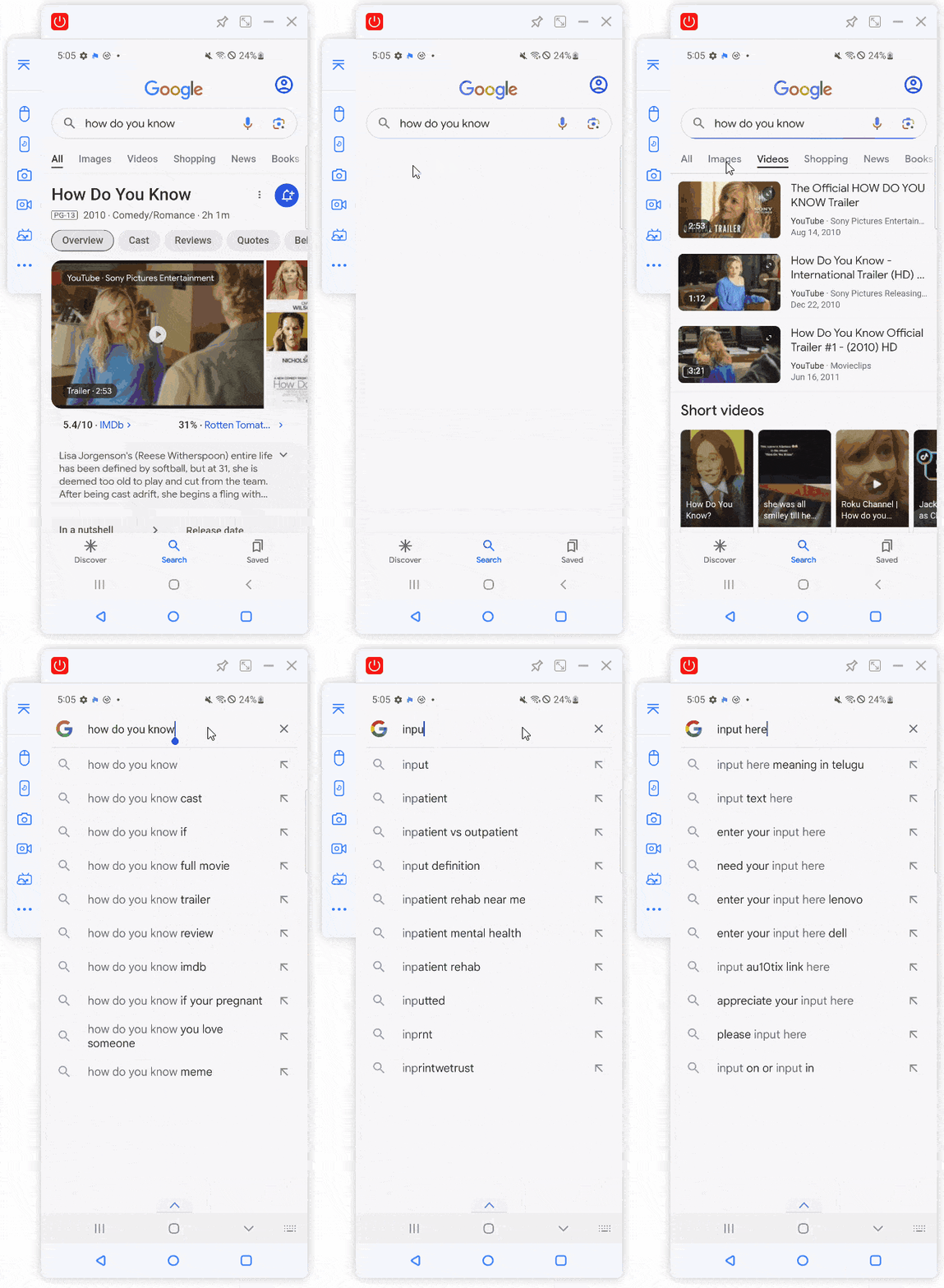
How to Share Screen From Android to Mac via iMyFone:
Step 1. Download and install iMyFone MirrorTo on your Android or Mac device.
Step 2. Open the app and select your Android device from the home screen.

Step 3. Connect your Android to your Mac using a USB cable or make sure both devices are on the same Wi-Fi. Then choose the connection method and device shown on the app.

Step 4. Follow the on-screen guide. Once connected, your Android screen will be mirrored to your Mac instantly. You can mirror and run your Android apps on Mac without any emulators.
Watch Video Tutorial on Casting Android screen to Mac


(Click to rate this post)
Generally rated 4.6 (256 participated)

Rated successfully!

You have already rated this article, please do not repeat scoring!

-
-

D-Back for iOS/Win/Mac - Data Recovery HOT
Recover Deleted Data from iOS/Win/Mac
Data Recovery
-

D-Back - Android Data Recovery
Recover Deleted Data from Android
Android Data Recovery
-

ChatsBack for WhatsApp - WhatsApp Recovery
Recover Deleted WhatsApp Messages
WhatsApp Messages Recovery
-

ChatsBack for LINE - LINE Recovery
Recover Deleted LINE Messages
LINE Messages Recovery
-
-
-

MirrorTo - Screen Mirror
Professional iOS/Android Screen Mirror
iOS/Android Screen Mirror
-

Fixppo for iOS - iPhone System Repair HOT
Fix your iPhone/iPad/iPod touch/Apple TV without losing data
iPhone System Repair Tool
-

UltraRepair - File Repair
Fix damaged and corrupted videos/photos/files/audio
Repair Corrupt Video/Photo/File
-
-
-

LokShorts - Locate best drama & short filmNEW
Online Watching 1-minute Short Drama
Online Watching 1-minute Short Drama
-

Filme - The Best Video Editor
Video Editor and Fast Slide Show Maker
Video Editor and Fast Slide Show Maker
-

MagicMic - Real-Time Voice Changer HOT
Change Your Voice in Real-Time Easily
Real-Time Voice Changer
-

MarkGo - Effective Watermark Remover
Manage Your Video & Image Watermark Easily
Effective Watermark Remover
-

VoxBox- Ai Text-to-Speech Generator
Make Voiceover Easily with Cloning & TTS
Text-to-Speech Voice Generator
-

AnySmall - Video CompressorNEW
One Click to Compress Videos While Keeping High Quality
One-click Video Compressor
-