

















 Shop
Shop


AnyTo - Best Pokemon GO Auto Walker
The best Pokemon GO walking app for iOS & Andorid. Use the 360-degree Pokemon GO joystick to auto walk in the game. Safe and simple. Try for free now.

Pokemon GO players are always looking for ways to level up faster, catch more Pokemon, and make the gameplay experience more enjoyable. One of the most popular solutions is the use of a Pokemon GO auto walker, a tool that allows you to enjoy the game without leaving your house.
But what exactly is a GPS Pokemon GO auto walker? How to auto walk in Pokemon GO? And what are the best options for iOS and Android in 2026? Let’s dive in and explore everything you need to know about Pokemon GO auto walking.
In this article:

What is a Pokemon GO Auto-Walking App?
A Pokemon GO auto walker is a third-party tool or a Pokemon GO spoofer app that allows players to simulate walking in the game without physically moving. Essentially, it tricks the game into thinking you're traveling to different locations. This is particularly helpful for completing in-game tasks such as hatching eggs, finding rare Pokemon, or participating in raids without having to actually walk long distances.
A Pokemon GO auto walking app works by using fake GPS to control your GPS location or using a joystick interface that mimics walking. Some tools even generate auto-walking routes for you.
How to Auto Walk in Pokemon GO?
GPS auto walking in Pokemon GO can be done using third-party apps like iMyFone AnyTo or PGSharp, which allow you to teleport in Pokemon GO or adjust your movement. These apps include features like joystick controls and cooldown timers to reduce detection risks.

Alternatively, some players use GPS spoofing devices that simulate movement or rely on in-game mechanics like Adventure Sync to accumulate walking distance passively. Each method has its advantages and risks, so it's important to use them wisely to avoid penalties.
Video Guide of Using Auto Walker in Pokemon GO
Watch this video guide to see how you can easily auto walk in Pokemon GO and explore the world without moving a step!
The Best Pokemon GO Auto Walker App for iOS & Android
1 Pokemon GO Auto Walk iPhone- iMyFone AnyTo
One of the best Pokemon GO walking app for iOS is iMyFone AnyTo. This walking app for Pokemon GO allows you to spoof iPhone location and simulate walking in Pokemon GO. It works seamlessly with all recent versions of iOS and doesn't require jailbreaking your device.
In addition to iOS, AnyTo also seamlessly supports the Android platform and and comes with plenty of game-friendly features. With it, you won’t feel stuck or limited by the challenges that rural players usually face.

AnyTo's Key Features
- The best Pokemon GO auto walker app that requires no cracked game. Pokemon GO error 12 solved completely.
- Seamlessly compatible with the latest iOS 26.4 and Android 16. Available for all players.
- 100% safe to download and use. No account suspension or soft ban.
- Catch the highest CP Pokemon in 1 click.
- 360-degree joystick allows you customize the route and speed, and simulate walking freely.
- The specific Game Mode offers you more advanced features, including Pokemon scanner, Pokestop map, IV checker, PvP battles finder, Nest Map, Live Atlas and so on.
- Free trial is available for everyone!
Steps to use iMyFone AnyTo to auto walk in Pokmeon GO:
Step 1: Download iMyFone AnyTo for free on your phone.
Step 2: Open AnyTo app. Follow the instructions in the software to complete the basic settings before changing location.
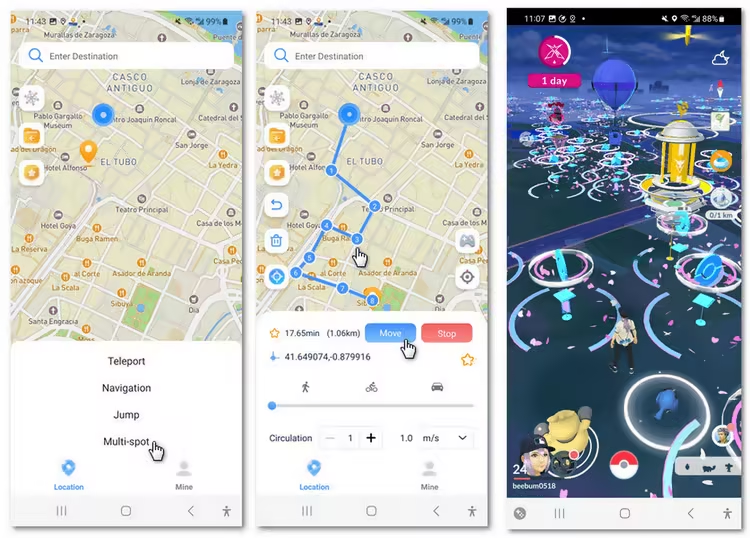
Step 3: Select the location or coordinates you want to change, choose the mode you like, and simply click the Move button to start.

You can also use AnyTo PC version to for Pokemon GO auto walking on iOS/Android:
Connect your iPhone/Andoid device to the PC. Click "Get Started".
Select Teleport Mode or Multi-spot Mode to plan a route.
Click the Move button to change location on the map to this new location!


2 Pokemon GO Auto Walker Android - Lexa
For Android users, Lexa Fake GPS Location is one of the most popular Pokemon GO auto walkers available. It allows you to auto walk and fly to different locations, giving you full control over your in-game movements. One downside is that this app doesn’t include a Pokemon GO cooldown feature. Another is that it’s much safer to use on a rooted Android device. Using this GPS spoofer alone can put your Pokémon GO account at higher risk.
Step 1: Download and install Lexa Fake GPS Location.

Step 2: Enable developer options and allow Mock Locations on your phone.
Step 3: Set Lexa Fake GPS as the Mock Location app.
Step 4: Open Lexa Fake GPS Location and set your location.
Step 5: Open Pokemon GO and use the auto walk feature.


Tips
iMyFone AnyTo also supports auto walking in Pokemon GO on Android, and compared to other walkers, it offers more advanced game features such as the PokeStop map, Pokemon scanner, Raid finder, helping you catch the rarest Pokemon in Pokemon GO easily!
FAQs about Pokemon GO Auto Walker
1.Are there any risks of auto walking Pokemon GO?
Yes, while using Pokemon GO auto walker apps can enhance your gameplay, there are some risks involved. Pokemon GO’s developers, Niantic, actively monitor players for suspicious activity, and using location changers or auto walkers can result in account bans or soft bans if detected. To protect your account, you can try the safer Pokemon GO walker iMyFone AnyTo.
2.Do auto walkers still work for Pokemon GO in 2026?
Yes, auto walkers are still functional in Pokemon GO in 2026, and you can use them to play the game with ease. However, it’s essential to choose an app that stays updated and follows all necessary safety protocols to avoid detection.
3.Can I auto walk in Pokemon GO iOS for free?
While there are some free options available, many of the most reliable auto walking apps, like iMyFone AnyTo, offer premium features. You can often try these apps for free with limited functionality before deciding to pay for the full version.
Conclusion
Auto walking in Pokemon GO offers players a unique way to experience the game without the need for physical movement. Whether you're looking to catch more Pokemon, hatch eggs faster, or explore different locations, using an Pokemon GO auto walker can save you time and effort.
For iOS and Android players users, iMyFone AnyTo is an excellent auto walker choice. Enjoy your journey through the world of Pokemon GO!


Spencer Hill has over 5 years of experience specializing in mobile screen mirroring and virtual location modification. As a senior editor at iMyFone, he creates user-friendly tutorials that help mobile users maximize their device functionality.
-
Jurassic World Alive Hacks 2026: Cheats That Still Work
What does Jurassic World Alive hack mean? What are the available Jurassic World Alive cheats in 2026? Can you actually cheat in JW Alive? Find the answers here!
7 mins read -
Forever Friends & Remote Trades: What You Need to Know
Find out how Forever Friends and Remote Trades work in Pokemon GO, how to become Forever Friends, and how this new feature affects everyone.
9 mins read -
AnyTo Plus – Safely Change iPhone Location Using Android (No Jailbreak Needed)
AnyTo Plus is a location changer that lets you spoof your iPhone GPS using an Android phone. Works with official Pokémon GO and MHN – no jailbreak required.
8 mins read -
Hyper Training Guide: Best Pokémon for Silver Bottle Caps in Pokémon GO
How does Silver Bottle Cap work in Pokémon GO? Which Pokémon should you use the Silver Bottle Cap on? Check out this ultimate Hyper Training guide!
8 mins read -
Pokémon GO Urban vs Rural Challenges: Tips for Rural Players
This article explore Pokémon GO's urban vs rural challenges, Niantic's needed fixes, and smart tips to help rural trainers level up their experience.
7 mins read -
How to Get Unown in Pokemon GO? [2026 Ultimate Guide]
Discover how to get Unown in Pokemon GO! Learn Unown shiny rates, spawn tips, full alphabet list, and the 5 best ways to find this ultra-rare Pokemon in 2026.
8 mins read
Was this page helpful?
Thanks for your rating
Rated successfully!
You have already rated this article, please do not repeat scoring!