
















 Shop
Shop


If your iPhone is taking forever to update to iOS 27, the problem may be server load, weak Wi-Fi, low storage, a stuck preparing/verifying stage, or a failed install after restart.
This guide explains how long each update stage should take, how to tell whether the iOS update is stuck, and what to do before you force restart or use a repair tool.


Quick answer
If an iOS 27 update taking forever still shows progress, wait and keep the iPhone charged. If the iPhone update taking too long is stuck on Preparing Update, Verifying Update, or an Apple logo for a long time, check Wi-Fi, storage, server status, and battery before using an iOS system repair tool or a computer update path.
In this article:
- How Long Does an iOS 27 Update Take?
- Why Is My iOS 27 Update Taking So Long?
- Fix iOS 27 Update Taking Forever with Fixppo

- 6 Basic Fixes for iPhone Update Taking Too Long
- Check Apple Server
- Check Network Connection
- Check iPhone Storage
- Reset Network Settings
- Force Restart iPhone
- Use Finder / Apple Devices / iTunes to Update iPhone
- FAQs
How Long Does an iOS 27 Update Take?
If your iPhone is fully charged with a stable network connection, then it should take at least 30 minutes for iPhone to complete the update process, depending on the network connection and the size of the update.
Another factor is your device's age. Older iPhone may take longer to update due to slower processing ability compared to newer models. The table below lists the different statuses that will occur during the iOS update process and the expected timing, you can take a quick look.
| Update Process | iOS 27 Update Time |
|---|---|
| iOS 27 Update Download | 10-20 minutes |
| iOS 27 Preparing Update | 5-10 minutes |
| iOS 27 Verifying Update | 5-10 minutes |
| iOS 27 Update Installation | 10-20 minutes |
| iOS 27 Set Up After Update | 5-15 minutes |

Tips
1. If your iPhone is taking forever to update, and you need to unfreeze it safely with a lower risk of data loss after backing up important data because you don't have any backup, then this Fix iOS 27 Update Taking Forever with Fixppo is recommended.
2. If your iPhone is working fine, but only because the iOS update is very slow, you can head to Basic Fixes for iPhone Update Taking Too Long, though some of them may cause you data loss.
Why Is My iOS 27 Update Taking So Long?
You may wonder: Why is my iPhone taking so long to update? Is this iOS update taking forever just for me? The answer is NO.
This problem is quite common every time there is a new iOS version released, you're not the only victim. So, let's focus on why this issue becomes a common phenomenon.

- Low Storage Space: If your iPhone has little available storage, the update may take longer or stuck halfway.
- Slow Internet Connection: A weak or slow Wi-Fi connection can significantly delay the iOS download and installation process.
- Server Overload: When a new iOS version is released, like the new iOS 27, Apple’s servers may be overloaded, leading to slower download speed.
- Large Update File: Major iOS update can be quite large, requiring more time to download and install.
Fix iOS 27 Update Taking Forever with Fixppo
Fixppo, an iOS system repair tool, fits cases where the iOS 27 update already failed and the iPhone is frozen, looping, or stuck in recovery mode. It should not be the first step when the update is simply downloading slowly.
Use Fixppo when the iOS update stuck state does not clear after network, storage, and restart checks. It is best positioned for failed update, stuck Apple logo, or recovery-mode cases after an iOS 27 install attempt.
It's possible that your iPhone stuck on verifying update or other update statuses over the long term. In such cases, you can use an iMyFone Fixppo, which can help complete the update with a lower risk of data loss after backing up important data while fixing the iOS glitches that cause your iOS 27 update taking forever.
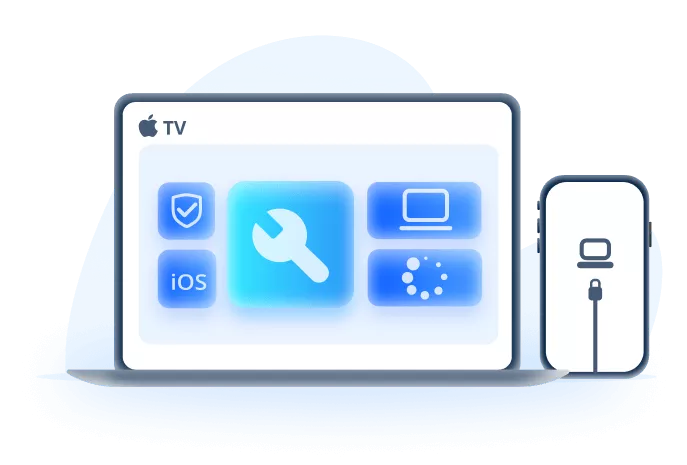
When Fixppo makes sense:
- Fixes Update Stuck Issues: It can fix iPhone update taking so long issue and update iPhone to iOS 27 at the same time.
- Lower Data Risk: Unlike Finder / Apple Devices / iTunes, 100% ensure to keep all iPhone data while fixing update-related issues.
- Wide Compatibility: Compatible with many supported iPhone models and iOS versions, including iPhone 17/16 and iOS 27.
- Update iOS Without OTA/Finder / Apple Devices / iTunes: Easily update to iOS 27 without via OTA or Finder / Apple Devices / iTunes, saving time and trouble.
- Fast Repair Process: Easy-to-use interface that guides you through the repair in just a few clicks.
- Other Key Features: Fixes iPhone frozen during update, iPhone stuck on preparing update...
How to fix iOS update taking so long? This question can be answered by Fixppo. Let's see how to use it.
Step 1: Download and install Fixppo. Open it to choose Start Repair, which is the best option to fix iPhone update stuck issue.

Step 2: Connect your iPhone to the computer and go to Standard Mode, which can fix iPhone update-related issues with a lower risk of data loss after backing up important data.

Step 3: When Fixppo detects your device and shows the available iOS firmware for downloading, click on the Download button to get the firmware.
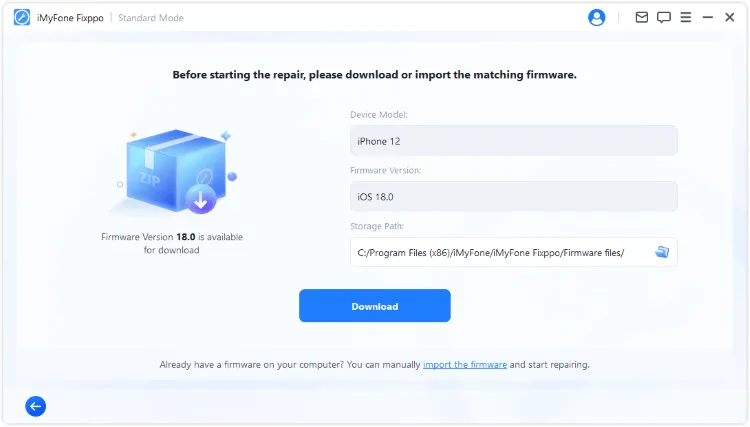
Step 4: After downloading, click the Start Standard Repair button, Fixppo will begin to fix the iOS update problem using the firmware.
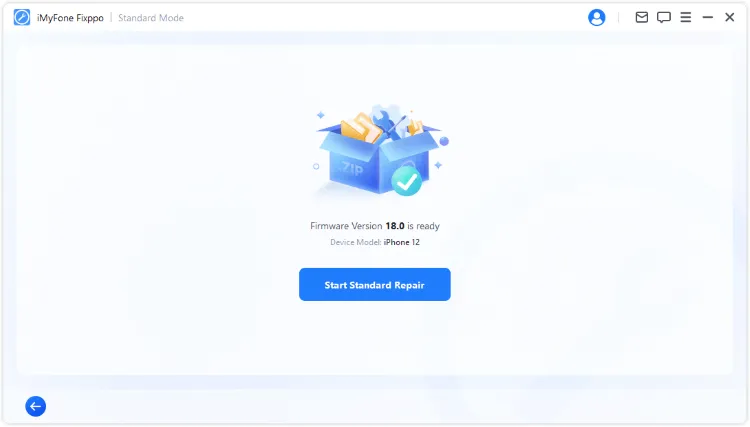
After repairing, your iPhone will restart and you can see that not only has the update issue been fixed, but also your iPhone has been updated to the latest version. You won't encounter any update issues next time.

You can also watch the intuitive video to fix iPhone update issues:

6 Basic Fixes for iPhone Update Taking Too Long
The following methods are the most basic ones you can try if you have met the iOS 27 update taking forever issue while updating the iPhone via the OTA method.
1 Check Apple Server
Check Apple server status before repeating the update. A major iOS release can slow downloads even when nothing is wrong with your iPhone.
When you want to make a major update, like from iOS 26 to iOS 27, this reason is always considered. So, you can go check if the server is busy and is having a temporary downtime. If yes, we would suggest you update your iOS sometime later.

2 Check Network Connection
Use stable Wi-Fi and avoid VPN or captive networks. A weak connection can make the iPhone software update slow or leave the update stuck during download.
If you are updating your device through cellular data, you need to be sure that the network connection is stable. If it doesn't, we recommend that you use a Wi-Fi connection over cellular data to stop iPhone taking forever to update.

3 Check iPhone Storage
Free storage before retrying. iOS needs room for the download, unpacking, installation, and cleanup after restart, like 5-8 GB.
If iPhone storage is full and not available for iOS 27 files, the download and install process could fail, making your iPhone update taking forever.
To check this, head to Settings, navigate to the General tab, then get into Storage to check how much storage is left on your iPhone. If it's too full, free up some space for the iOS update.

4 Reset Network Settings
Switching to a stronger network may fix this issue. If not, you can reset the network settings in order to remove all the glitches that might have been creating hindrances if iOS 27 update taking forever.
This is an advanced method if you can't solve the issue by simply switching from cellular data to Wi-Fi or changing a more stable Wi-Fi.

Step 1: Tap on Settings > General.
Step 2: Scroll down to find Transfer or Reset iPhone > Reset > Reset Network Settings.
Step 3: When you click on it, iPhone will ask you to enter the passcode then begin to reset your network.

Best Tool to Fix iOS Update Taking Forever Issues
If you don't want to risk resetting your iPhone out of data concern, Fixppo can preserve all your iPhone data, including settings and data, while fixing the iPhone update problem.
5 Force Restart iPhone
If iOS 27 is taking hours to update, you can go with one of the simplest ways of solving the problem by performing a force restart on your iPhone. Depending upon your iPhone model, the restart method is carried out in a different way. You can choose the method based on the iPhone model you have.

- To force restart iPhone 6 series:
- To force restart iPhone 7/7 plus models:
- To force restart iPhone 8/X/11/12/13/14/15/16/17 models:
Press and hold the Home and Power button together, wait until the Apple logo screen appears.
Press and hold the Volume Down and the Power button together, don't release until you see the Apple logo.
Press the Volume Up, then the Volume Down button, and finally press and hold the Power button. Release it when you see the Apple logo screen.
6 Use Finder / Apple Devices / iTunes to Update iPhone
If OTA update keeps failing, use Finder, Apple Devices app, or iTunes to update from a computer. Choose Update before Restore when Apple offers both.
Though Finder / Apple Devices / iTunes claims that updating iPhone using it won't cause data loss, users often find their iPhone stuck on connect to Finder / Apple Devices / iTunes during the process, so it's better to make a backup before starting.
Step 1: Connect your iPhone to the PC and launch the Finder / Apple Devices / iTunes.
Step 2: Click the Trust button on your iPhone, which allows Finder / Apple Devices / iTunes to update your iPhone.
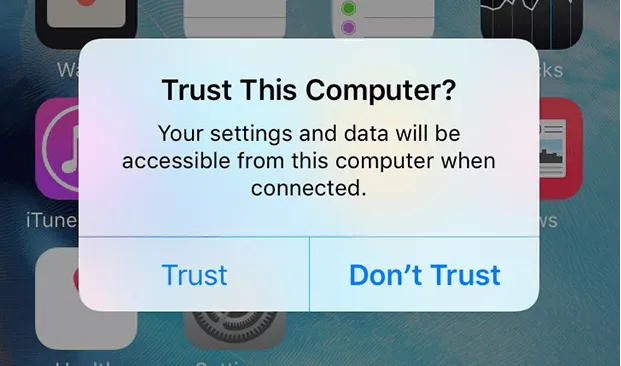
Step 3: Select the device icon from the Finder / Apple Devices / iTunes screen and get into the Summary section.
Step 4: Tap on the Check for Update button. Your device will then be updated to the latest iOS 27.

FAQs
How long should an iOS 27 update take?
Many updates finish within 30 to 60 minutes, but large downloads, busy servers, and older devices can take longer. The key is whether progress is still moving.
When is an iOS update stuck?
Treat it as stuck if the same screen has not changed for a long time, the device is looping, or it returns to the same preparing/verifying state after restart.
Will force restart cancel the update?
It can interrupt the process. Use it only when the update is clearly frozen, and be ready to use a computer update or repair path if the device will not boot.
Conclusion
An iPhone software update slow problem is not always a failure. Wait when progress continues, fix Wi-Fi and storage when download stalls, and use Fixppo or Apple computer update only when the iOS 27 update is truly stuck.


Melvin Cooper has over 10 years of experience in the technology industry and is an expert at providing tips and handy solutions to Apple and Android users. Dedicated to helping millions of users improve their experience with mobile devices, he has maintained an impressive record of solving problems.
-
Fix iPhone Stuck on Update Requested [iOS 18/26 Supported]
iPhone stuck on update requested? Learn why it happens and discover 8 proven solutions to get your iOS update back on normal without data loss.
3 mins read -
[2025 New] How to Stop iOS 17/18/26 Update in Progress?
How to stop iOS 17/18/26 update in progress when you feel like staying in the current iOS version? Here's how to do it via 4 methods.
3 mins read -
5 Ways for iOS 26 Beta Download [Developer & Public Beta]
How to get iOS 26 beta? Whether you want to download iOS 26 developer or public beta, you can find the suitable methods with our guide. 5 Ways here!
3 mins read -
17 Important Facebook Statistics You Should Know in 2025
Do you want to know some up-to-date Facebook statistics? We break down 17 must-know Facebook stats about demographics, engagement rate and more.
3 mins read -
[2025 Full Guide] All About iOS Update Issues and Solutions
Have you encountered different problems during or after iOS update? This article focuses on all iOS update issues and solutions. Hope you can learn from it.
5 mins read -
[Full Guide] 50+ iOS 18 Bugs and Fixes You Should Know 2025
What are some known iOS 18 bugs? Read on this article to learn everything about iOS 18 bugs and fixes.
5 mins read
Was this page helpful?
Thanks for your rating
Rated successfully!
You have already rated this article, please do not repeat scoring!