















 Shop
Shop


Try a safer way to play. AnyTo lets you change location smoothly without risky mod stores. Explore global Pokémon GO hotspots confidently with a stable, trusted tool that actually works in 2026.
Remember when TutuApp was the go-to solution for Pokémon GO players looking to bend the rules a little? This third-party app store was known for delivering tweaked games, modded apps, and yes, the famous hacked Pokémon GO clients like iPoGo.
But fast-forward to 2026 and the landscape looks very different. The name still echoes in old forums, yet its service barely resembles what it used to be. So does TutuApp still work today? And what about TutuApp Pokémon GO? Let’s take a clear look at the truth.

Quick Navigation

Does TutuApp Pokémon GO still work in 2026?
The TutuApp situation in 2026 is... complicated. Its reputation has faded, but traces of it still exist. Here’s the current reality:
1 Does the TutuApp still work?
Yes, TutuApp technically still exists, but its performance is unstable. From what I've discovered, users are constantly battling with revoked certificates, broken downloads, and apps that stop launching without warning.
This means you may need to reinstall or refresh apps frequently, sometimes multiple times a week, just to keep them running.

2 Does TutuApp still work for Pokémon GO?
It's unreliable at best, dangerous at worst.
Here's what's happening: You can still technically download the iPoGo Pokémon GO mod from TutuApp. I've seen it in their app library, and some users report successful installations. But—and this is crucial—it's not the official download method supported by iPoGo anymore.
How to download TutuApp Pokémon GO on iOS
This process is more complicated than it used to be, and the results aren't guaranteed.
Step 1. Go to the official TutuApp website.
Step 2. Download TutuApp VIP for iOS.

Step 3. Navigate to Settings > Profile Downloaded > Install. You'll then need to purchase TutuApp VIP to proceed.

Step 4. Launch the TutuApp and use the search function to find "Pokémon GO Hack by iPogo." When you locate it, tap Install and follow the on-screen instructions.

How to download TutuApp Pokémon GO on Android
The Android process is somewhat more straightforward
Step 1. Visit the official TutuApp website.
Step 2. Download the TutuApp APK file for Android to your device. You'll need to enable "Install from Unknown Sources" in your security settings if you haven't already.

Step 3. Open TutuApp, search for "Pokémon GO (mod by ipogo)," and download it.

The Android version tends to be slightly more stable than iOS, but that's not saying much. You're still dealing with the same fundamental issues: revoked certificates, broken features, and constant reinstallations.
Is TutuApp Pokémon GO safe?
Let's be brutally honest: no, TutuApp is neither safe for your device nor for your Pokémon GO account.

Device Safety
When you download apps from third-party stores like TutuApp, you're bypassing Apple's and Google's security measures. These measures exist to protect you from malicious software.
During my testing, I noticed several concerning things:
- Your device becomes exposed to potentially bundled malware that can steal your personal data.
- Multiple users have reported being bombarded with intrusive pop-up ads and notifications while playing TutuApp Pokémon GO. It's not just annoying; it's a sign that something sketchy is running in the background.
- One user I spoke with had to factory reset their iPhone after installing TutuApp because their battery started draining at an alarming rate, and they noticed unusual network activity.
Account Safety
This is the part that really concerns me as a long-time player.
Since TutuApp isn't the official download method supported by iPoGo, the anti-ban mechanisms that normally protect modified app users may be broken or completely absent during the download process.
As soon as you log into this Pokémon GO mod, there's a high chance you'll be detected by Niantic's anti-cheat system. We're talking about immediate detection, not "maybe you'll get caught eventually."
The typical result? A 7-day account ban at minimum.

Is it worth risking an account you've spent years building? An account with rare shinies, perfect IV Pokémon, and countless hours of progress? I don't think so.
Safest alternative to TutuApp Pokémon GO—iMyFone AnyTo
If you want the freedom to fly in Pokémon GO without risking your phone or your account, iMyFone AnyTo is a reliable alternative to TutuApp. Unlike TutuApp, which distributes modified game files, AnyTo takes a fundamentally different and much safer approach.
It's not a mod. This is the crucial difference. AnyTo doesn't modify the Pokémon GO app itself. Instead, it changes your device's GPS location at the system level. You're still using the official Pokémon GO app downloaded directly from the App Store or Google Play.


AnyTo's Key Features
- Safe Bluetooth GPS spoofing: Teleport in Pokémon GO to any location, use a joystick for manual movement, generate custom routes, and even auto-walk.
- Interactive maps for spawns, PokéStops, Gyms, raids, routes, and quests.
- IV checker for Hundo sniping. The built-in IV checker lets you scan Pokémon before catching them and and offers convenient teleportation.
- Auto raid, auto Rocket Battle & auto catch. AnyTo can automatically join and battle in raids, automate Team GO Rocket encounters, and catch Pokémon with the virtual GO Plus.
- Full anti-ban mechanism. Designed specifically for location spoofing, AnyTo includes comprehensive safety features such as cooldown helper, VPN + fake GPS spoofing, and more.
- Easy official download. No sketchy third-party app stores. Regular update and quick tech support.
How to spoof Pokémon GO with AnyTo Android or iOS:
Step 1. Download and install AnyTo on your device.
Step 2. Connect your phone via Bluetooth (recommended), WiFi, or USB, and then choose Game Mode to unlock more features for Pokémon GO.
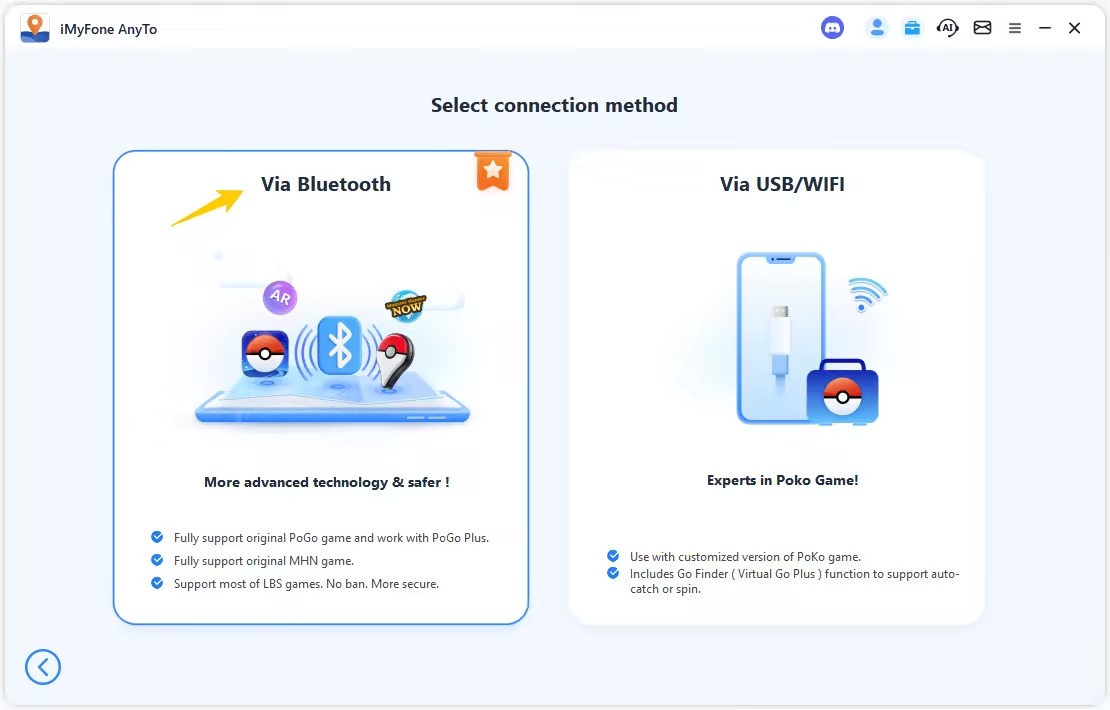
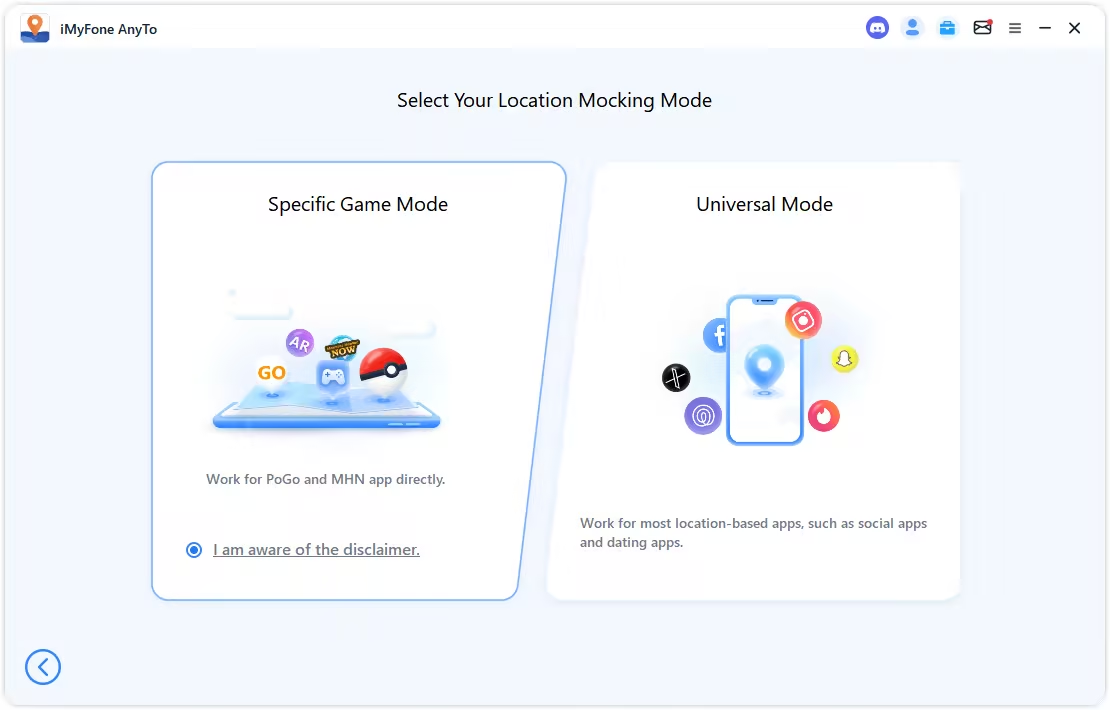
Step 3. Set your destination by tapping on the map, entering coordinates, or searching for a place. Then select Teleport Mode to change your location.
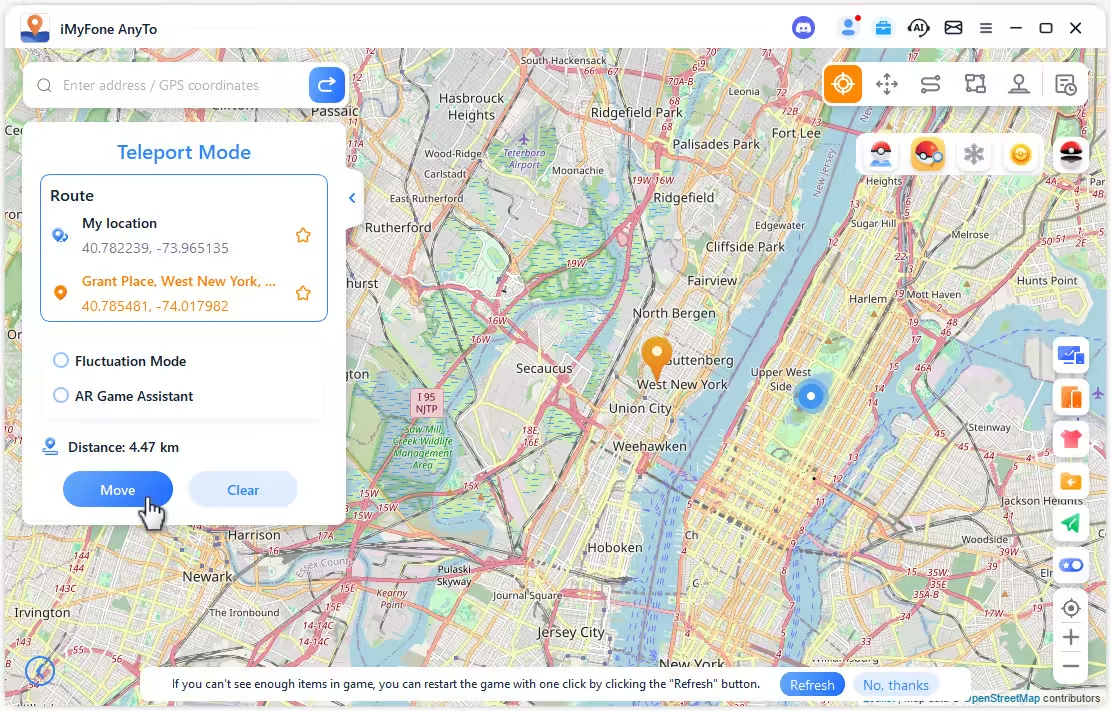
You can also change location in Pokémon GO without using a computer. Follow the detailed setup guide to install the AnyTo's app version.(iGo for iOS)

AnyTo's New Feature #1: Go Finder is a virtual GO Plus that helps you auto-catch and auto-spin PokéStops.

AnyTo's New Feature #2: AnyTo Plus is the newest upgrade in iMyFone’s AnyTo lineup for iPhone users. It works through Bluetooth pairing between an Android phone and your iPhone, letting you change your iPhone’s location directly without using a PC.

Final thought
TutuApp Pokémon GO in 2026 is a shadow of what it once was. The constant certificate revocations, broken features, security risks, and high ban probability make it a poor choice for anyone serious about Pokémon GO. If you're currently using TutuApp, stop. The risks far outweigh any potential benefits.
If you're looking for a reliable spoofing solution, iMyFone AnyTo location changer is the answer. It's safer, more reliable, feature-rich, and actually supported by a legitimate company that provides updates and customer service. Give AnyTo a try, and experience what Pokémon GO spoofing should actually feel like.


Spencer Hill has over 5 years of experience specializing in mobile screen mirroring and virtual location modification. As a senior editor at iMyFone, he creates user-friendly tutorials that help mobile users maximize their device functionality.
-
Forever Friends & Remote Trades: What You Need to Know
Find out how Forever Friends and Remote Trades work in Pokemon GO, how to become Forever Friends, and how this new feature affects everyone.
9 mins read -
AnyTo Plus – Safely Change iPhone Location Using Android (No Jailbreak Needed)
AnyTo Plus is a location changer that lets you spoof your iPhone GPS using an Android phone. Works with official Pokémon GO and MHN – no jailbreak required.
8 mins read -
Hyper Training Guide: Best Pokémon for Silver Bottle Caps in Pokémon GO
How does Silver Bottle Cap work in Pokémon GO? Which Pokémon should you use the Silver Bottle Cap on? Check out this ultimate Hyper Training guide!
8 mins read -
Pokémon GO Urban vs Rural Challenges: Tips for Rural Players
This article explore Pokémon GO's urban vs rural challenges, Niantic's needed fixes, and smart tips to help rural trainers level up their experience.
7 mins read -
Mega Metagross Pokémon GO Debut: Best Moveset, Counters, Stats & Guide
Mega Metagross is finally making its debut in Pokémon GO next season! Learn how to get it, its best moveset, top counters, and key stats to dominate battles.
6 mins read -
How to Beat Dialga in Pokémon GO: Weakness & Best Counters [Raid Guide]
Dialga returns as a Tier 5 Raid Boss in Pokémon GO this September! Learn Dialga's weakness, best counters, and how it compares to Origin Forme and Palkia!
10 mins read
Was this page helpful?
Thanks for your rating
Rated successfully!
You have already rated this article, please do not repeat scoring!