















 Shop
Shop


Switch from unstable spoofers to AnyTo—reliable, Pokémon GO–focused, and anti-ban ready. Teleport, simulate movement, and play on PC or mobile safely. Try AnyTo free today and level up faster and smarter!
iMoveGo is a third-party software application that promises to change your GPS location on iOS or Android to any virtual spot in the world.
I've seen a lot of questions floating around about whether iMoveGo is a good option for casual location changing and Pokémon GO GPS faking. After testing it myself and combing through community threads, user reports, and long-running discussions in spoofing forums, I’ve pulled together a clear, no-nonsense review.

Quick Navigation

What Does iMoveGo Do?
iMoveGo is a handy location changer available on iOS and Android devices, commonly used for apps and games that react to your physical position, including Pokémon GO.
At its core, iMoveGo lets you fake your location with the usual toolkit you’d expect from a spoofing app: instant teleporting, route creation, and joystick-style movement.

Beyond the basics, it adds several extra features designed to make location-based gaming smoother:
- Pokémon GO Maps. Browse maps that display nearby Pokémon, PokéStops, and Gyms, and search for specific spawns.
- Cooldown Timer. Helps you avoid soft bans in Pokémon GO by automatically calculating how long you should wait after jumping long distances.
- Customizable Movement Speeds. Simulate walking, cycling, or driving with steady or dynamic speed adjustments.
- GPX File Import/Export. Save custom routes or load GPX files, though some users report that it works best with GPX files generated inside the software.
- Multi-Device Control. Spoof locations on several devices at once (typically 5 to 10, depending on the subscription).
- Location History. Quickly revisit any previously used coordinates.
- Bluetooth, USB or Wireless Control. Connect your phone via Bluetooth, USB, or Wi-Fi to operate the spoofing features.
- Map Skin Options. Switch between different map styles, including 3D or alternate visual modes.
- No Jailbreak or Root Needed. Works on standard iPhones and most Android devices without unlocking the system.
Is WooTechy iMoveGo Safe?
From a device-security standpoint, it’s generally low-risk. It doesn’t contain bundled malware, nor does it show signs of stealing your personal data.
When it comes to Pokémon GO safety, the picture shifts a little. No third-party spoofing tool can guarantee a completely ban-proof experience, and iMoveGo is no exception. That said, it does include safeguards like a Pokémon GO cooldown timer and Bluetooth-based connection spoofing, both designed to reduce detection.
If you follow the setup instructions carefully, keep your movements realistic, avoid frequent teleportation, and respect the cooldown, you should be reasonably safe.
iMoveGo vs Anyto: Which One Is Better?
When it comes to long-term stability and overall user experience, iMoveGo it might not stack up as well against many other Pokémon GO spoofers on the market.
Some users have reported stability problems such as app crashing or getting stuck in a loading state. Because of these issues, many players have switched to an alternative, iMyFone AnyTo location changer.

Why AnyTo Is the Better Alternative
iMyFone AnyTo is considered the best alternative to iMoveGo for several reasons. It's a tool built with more Pokémon GO–focused features and a stronger anti-ban system. It even lets you play Pokémon GO on computer using the Screen-to-Play function.

AnyTo Location Changer vs iMoveGo
- Features
- GPS Spoofing
- Maps
- Auto Catch
- IV Calculator
- Auto Raid
- Auto R-Battle
- Enhanced Throw
- iMoveGo
- AnyTo
How to Change Location with AnyTo
Step 1. Download and install AnyTo on your device.
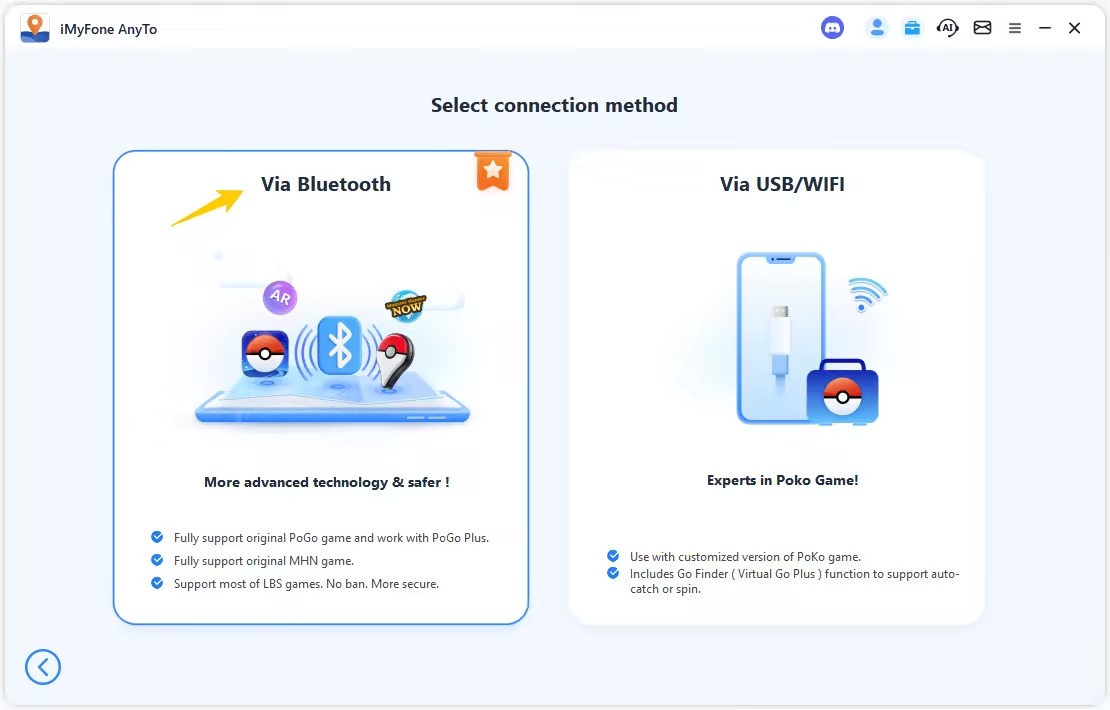
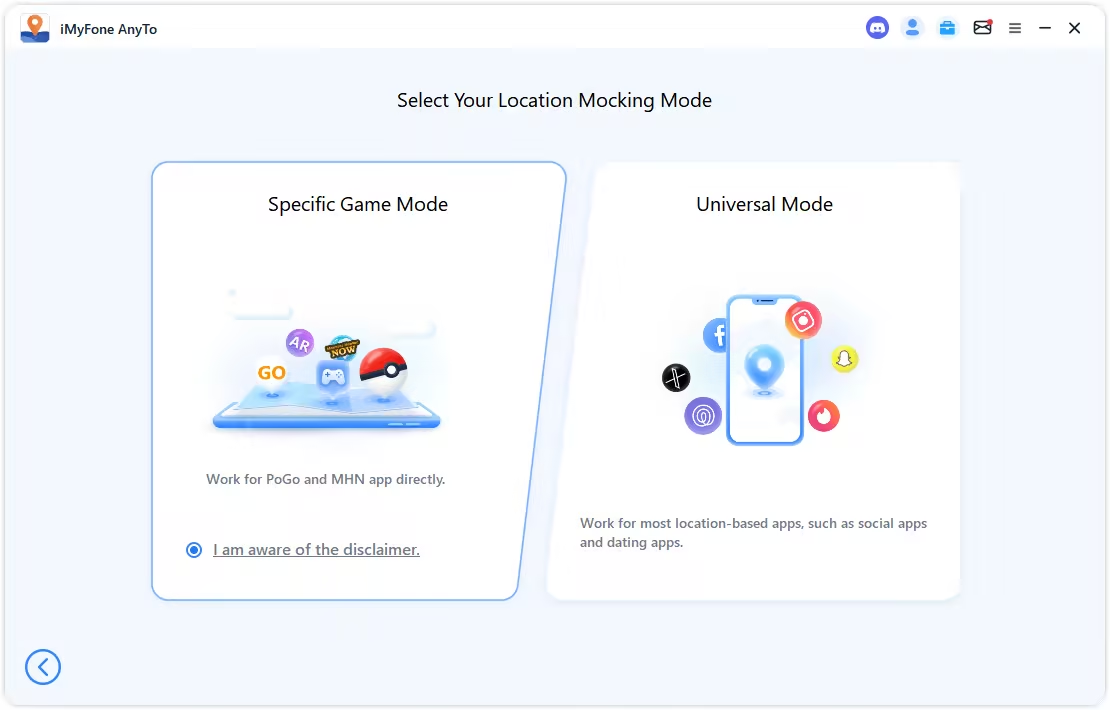
Step 2. Connect your phone via Bluetooth (recommended), WiFi, or USB, and then choose Game Mode to unlock more features for Pokémon GO.
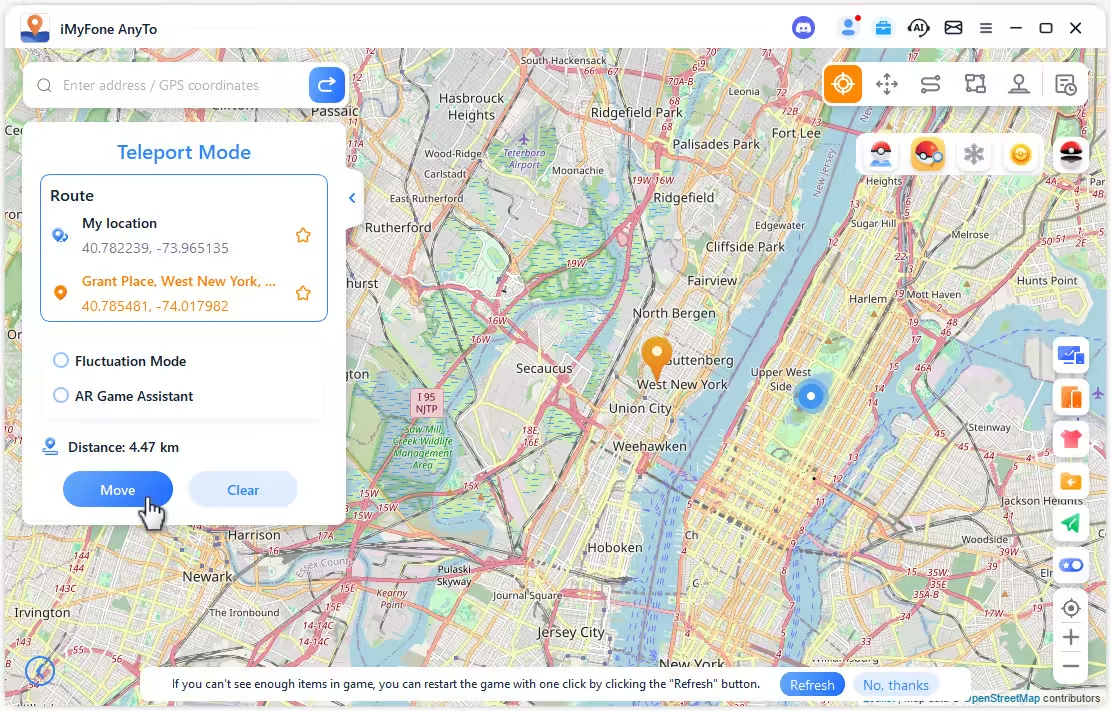
Step 3. Set your destination by tapping on the map, entering coordinates, or searching for a place. Then select Teleport Mode to change your location.

Note
You can also change location in Pokémon GO without using a computer. Follow the detailed setup guide to install the AnyTo's app version.(iGo for iOS)

AnyTo's New Features
AnyTo's New Feature #1: Go Finder is a virtual GO Plus that helps you auto-catch and auto-spin PokéStops.

AnyTo's New Feature #2: AnyTo Plus is the newest upgrade in iMyFone’s AnyTo lineup for iPhone users. It works through Bluetooth pairing between an Android phone and your iPhone, letting you change your iPhone’s location directly without using a PC.

FAQs about WooTechy iMoveGo
Is iMoveGo legit?
Yes, iMoveGo is a legitimate location-changing tool.
But if you’re asking whether using it for Pokémon GO spoofing is legit, the answer is no. Spoofing violates Niantic/Scopely’s Terms of Service, and any tool you use carries some level of risk. If you decide to spoof anyway, make sure you’re using a more stable and Pokémon GO–focused option like AnyTo to reduce the chance of detection.
How to download iMoveGo for PC?
Just head to the official WooTechy website and use their download button for Windows or macOS.
Does iMoveGo still work?
Yes, it still works. However, it’s no longer actively maintained the way it used to be, so updates and bug fixes arrive far less frequently.
Final Thought
iMoveGo works as a basic location changer, but its occasional stability issues and limited Pokémon GO–specific tools make it hard to recommend as a long-term solution. If you only need simple teleporting or joystick movement, it can get the job done. But if you want smoother performance, richer features, and stronger anti-ban protection tailored for Pokémon GO, iMyFone AnyTo clearly stands out as the better option.
Choosing the right tool matters when your account is on the line, so go with the one that offers both reliability and peace of mind.

 AnyTo Discord Server


Spencer Hill has over 5 years of experience specializing in mobile screen mirroring and virtual location modification. As a senior editor at iMyFone, he creates user-friendly tutorials that help mobile users maximize their device functionality.
-
Forever Friends & Remote Trades: What You Need to Know
Find out how Forever Friends and Remote Trades work in Pokemon GO, how to become Forever Friends, and how this new feature affects everyone.
9 mins read -
AnyTo Plus – Safely Change iPhone Location Using Android (No Jailbreak Needed)
AnyTo Plus is a location changer that lets you spoof your iPhone GPS using an Android phone. Works with official Pokémon GO and MHN – no jailbreak required.
8 mins read -
Hyper Training Guide: Best Pokémon for Silver Bottle Caps in Pokémon GO
How does Silver Bottle Cap work in Pokémon GO? Which Pokémon should you use the Silver Bottle Cap on? Check out this ultimate Hyper Training guide!
8 mins read -
Pokémon GO Urban vs Rural Challenges: Tips for Rural Players
This article explore Pokémon GO's urban vs rural challenges, Niantic's needed fixes, and smart tips to help rural trainers level up their experience.
7 mins read -
Mega Metagross Pokémon GO Debut: Best Moveset, Counters, Stats & Guide
Mega Metagross is finally making its debut in Pokémon GO next season! Learn how to get it, its best moveset, top counters, and key stats to dominate battles.
6 mins read -
How to Beat Dialga in Pokémon GO: Weakness & Best Counters [Raid Guide]
Dialga returns as a Tier 5 Raid Boss in Pokémon GO this September! Learn Dialga's weakness, best counters, and how it compares to Origin Forme and Palkia!
10 mins read
Was this page helpful?
Thanks for your rating
Rated successfully!
You have already rated this article, please do not repeat scoring!