





















 Shop
Shop


Don’t let distance ruin big moments. AnyTo helps you fly safely, teleport to worldwide events, and enjoy every rare spawn without leaving your couch.
There are moments in Pokémon GO when you wish you could simply fly. Maybe there's a massive Magikarp spawn event lighting up Korea while you're stuck in LA, and you're desperately grinding for that Gyarados evolution.
The good news is you don't have to just watch the hype from afar. Thanks to reliable location-changing tools, you can fly in Pokémon GO safely and explore global hotspots without ever leaving your couch.

Quick Navigation

What Does It Mean to Fly in Pokémon GO?
Flying in Pokémon GO refers to spoofing. It's not about your character actually taking to the skies like a Pidgeot. Instead, it is a form of cheating where players use Pokémon GO GPS hacks to manipulate their in-game location.
With a tool like this, you will find Pokémon GO more fun than ever:
- You can participate in local events that are taking place in another continent.
- You can catch region-exclusive Pokémon like Kangaskhan and Mr. Mime
- You can do long-distance trades without the distance limit.
- You can teleport to raid hotspots and join raids without using up your valuable passes.
- For rural trainers with limited spawns, PokéStops and gyms, flying is a practical workaround to enjoy the full experience of the game.
How to Fly in Pokémon GO: Best Tools for iOS/Android
For iOS AnyTo Pokémon GO Location Changer
iMyFone AnyTo location changer is one of the best fake GPS apps for iOS (and Android) players. The developers clearly understand that Pokémon GO players come from all walks of life—some are dealing with mobility challenges, others live in areas where gyms and PokéStops are scarce. So they've built a full toolbox of hacks tailored to Pokémon GO.


AnyTo's Key Features
- Safe Bluetooth GPS Spoofing: You can teleport in Pokémon GO to any location, use a joystick for manual movement, generate custom routes, and even set your character to auto-walk.
- All maps you need: AnyTo includes live maps showing spawn points, active raids, PokéStops, gyms, routes, and even field research quests.
- IV Checker for Hundo Hunting: It helps you filter 100% IV instantly and offers convenient teleportation.
- Auto Raid, Auto Rocket Battle, & Auto Catch: It's almost like a Pokémon GO bot, execpt it's safer and works with the official Pokémon GO app.
How to fly in Pokémon GO with AnyTo iOS
Step 1. Download and install AnyTo IOS (iGo)on your computer.
Step 2. Connect your phone via Bluetooth (recommended), WiFi, or USB, and then choose Game Mode to unlock more features for Pokémon GO.
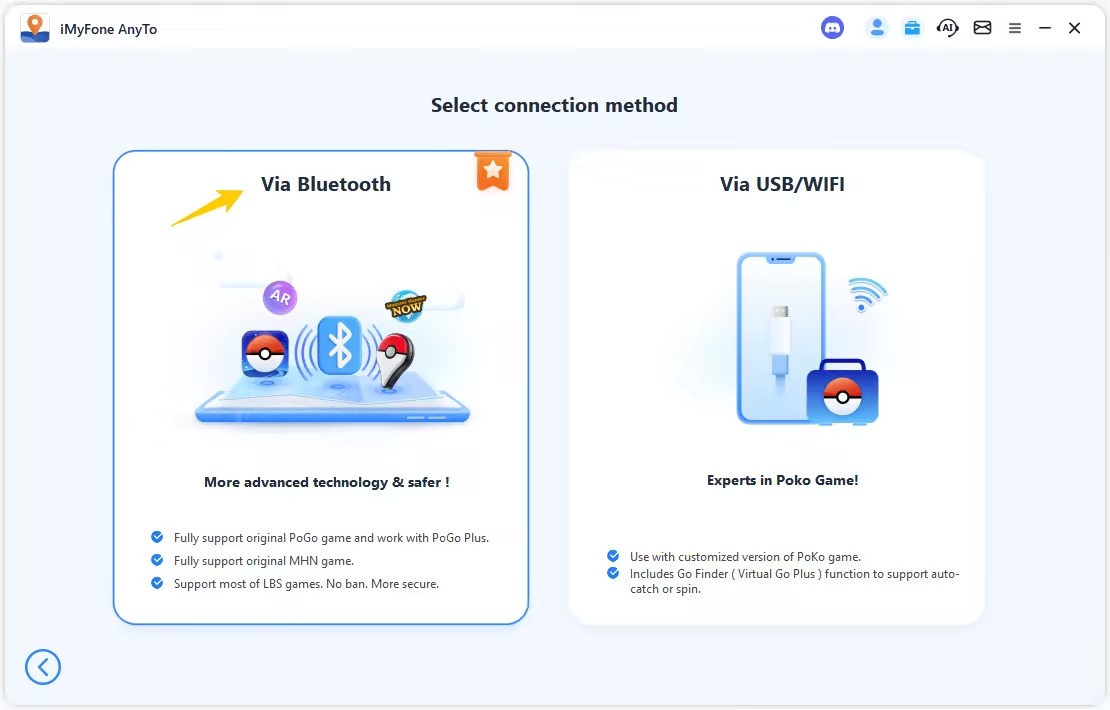
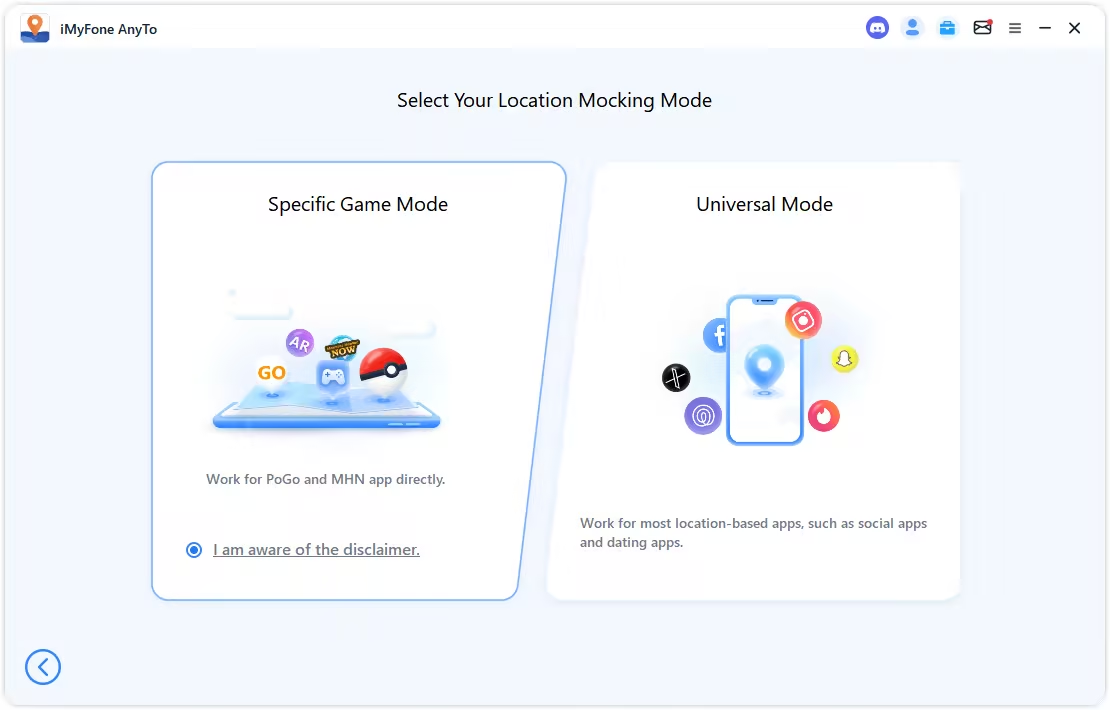
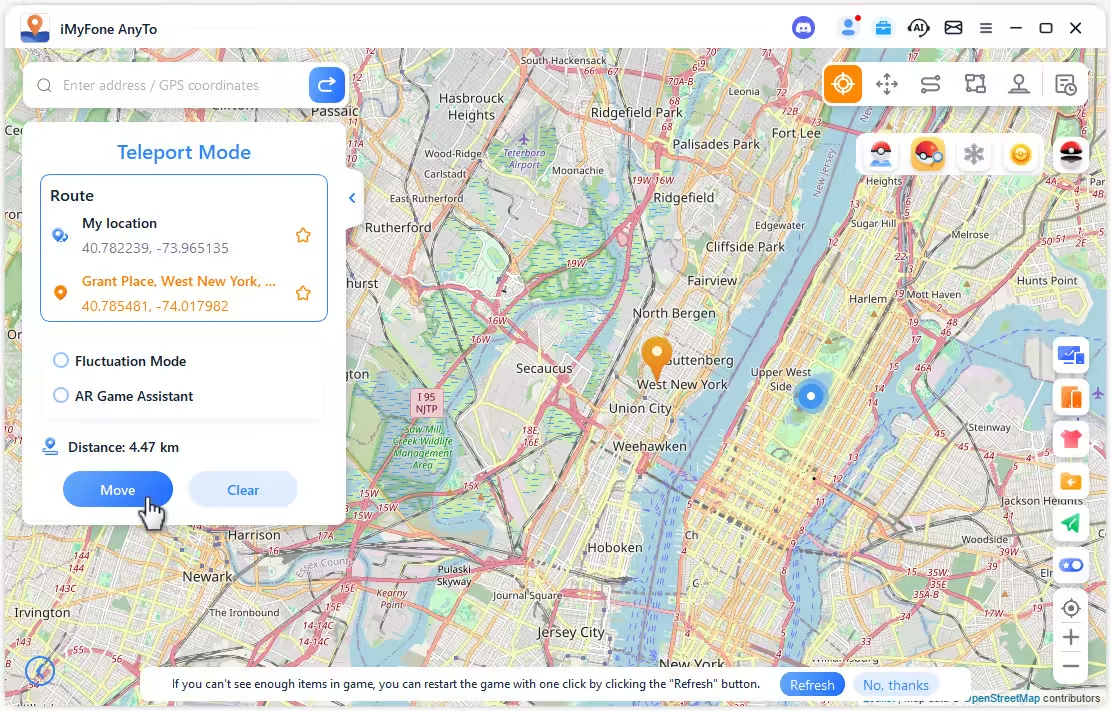
Step 3. Set your destination by tapping on the map, entering coordinates, or searching for a place. Then select Teleport Mode to change your location.
You can also change location in Pokémon GO without using a computer:


Pro tip from my experience
Our phones use a highly precise GPS chip, and spoofing that signal in Pokémon GO requires equally careful setup. Make sure you follow the detailed setup guide step by step to set up. And, if your AnyTo is not working, check out this guide to troubleshoot.
For Android Fly GPS App from Google Play Store
Now let's talk Android.
Fly GPS is a free app you can download directly from the Google Play Store or various APK sites. It's been around for years and has a dedicated following in the spoofing community.
Unlike AnyTo, Fly GPS runs directly on your Android device, no computer needed. You can teleport anywhere and control your movement with an on-screen joystick, all from your phone. But the catch is, Fly GPS wasn't specifically designed for Pokémon GO. It's a general-purpose location spoofer, which means it doesn't have built-in anti-detection features or a timers for Pokémon GO cooldown. You're flying without a safety net.
How to fly in Pokémon GO with Fly GPS
Step 1. Install Fly GPS from Google Play Store, enable developer mode, and select Fly GPS as your mock loation app.

Step 2. Tap on the map to choose your destination, tap the icon on the left, and then choose GPS Service Run.
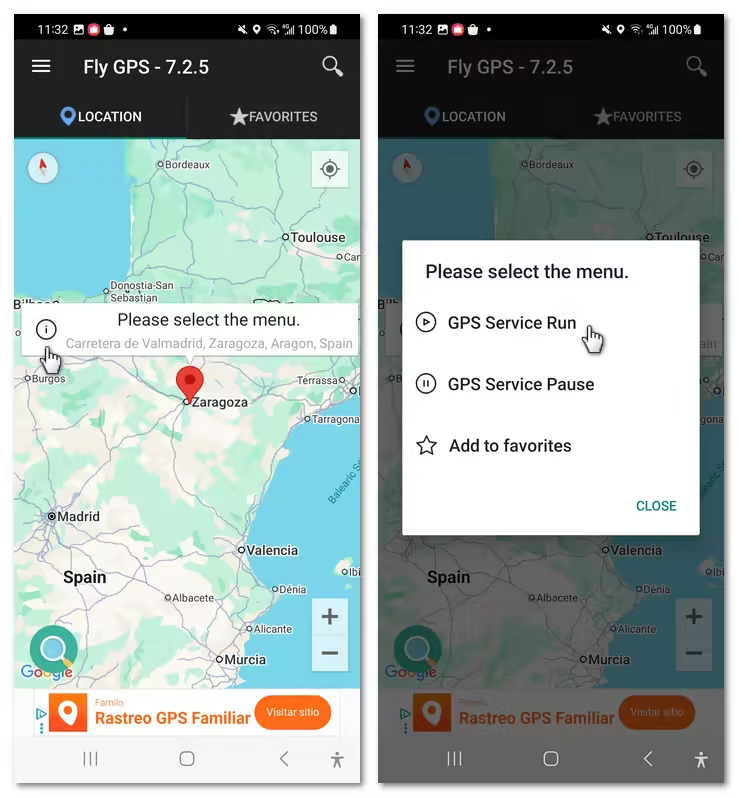
Step 3. The Fixed Location Mode is for teleportation, and the Move Location Mode works as a joystick overlay.

Note
Pokémon GO has built-in mock location detection, and the Fly GPS app will tip you out. There's a workaround, though. You'll need to pair it with LSPosed (or similar modules) to hide mock locations. This requires a rooted Android device
What You Can't Do When Flying in Pokémon GO
Flying gives you freedom, but it also comes with strict limits. Breaking these rules is the fastest way to lose your account. Here's what you should never do while spoofing:
- Don't teleport without respecting cooldowns.
- Don't perform actions during cooldown.
- Don't fly while you're still in an active raid or encounter.
- Don't mix real walking with long-distance teleports too quickly.
- Don't use unofficial modded Pokémon GO apps.
- Don't attempt to spoof during Niantic map outages or event overload.
Jumping continents within minutes (e.g., New York to Tokyo) will lock your catches, stops, and raids. Always follow the cooldown chart based on your last in-game action.
No catching, no spinning Stops, no feeding gyms, no gifting buddies, no remote raiding. Doing anything interaction-based before cooldown ends signals suspicious activity.
Teleporting mid-battle or mid-catch is an instant red flag.
Going from real GPS movement to a sudden 5,000-km jump looks unnatural to Pokémon GO's system.
Spoofing with modified clients (like modded GO apps) risks far more than using a GPS tool like AnyTo or other standalone spoofers.
These periods create GPS instability that can falsely flag unusual movement.
FAQs About Flying in Pokémon GO
Is Flying illegal in Pokémon GO?
Flying (spoofing) isn't illegal in a real-world legal sense, but it does break Pokémon GO's Terms of Service. The game discourages any form of GPS manipulation and may issue warnings, soft bans, or permanent bans if unusual movement is detected. Many players still spoof, but it always carries risk, so using safer tools like AnyTo and respecting cooldowns is essential.
What's the best app to fly in Pokémon GO?
iMyFone AnyTo is widely considered the best option. It uses Bluetooth-based movement control, offers cooldown guidance, and avoids risky modded Pokémon GO clients. You get teleport, joystick, auto-walk routes, spawn maps, raid info, IV checks, and more in one clean package.
What does "can't fly" mean in Pokémon GO trade?
It usually means they can't spoof their GPS location to meet the required trading distance. Pokémon GO only allows trades when both trainers are physically within interaction range. If a player can't change their location or doesn't want to risk spoofing, they can't complete the trade.
Conclusion
Flying in Pokémon GO opens the door to a bigger, brighter version of the game. You can access faraway events, rare regional Pokémon, and endless new places to explore.
But every shortcut comes with a shadow. Spoofing can be fun and practical, yet it always carries risk if you're not careful. If you decide to fly, use safer tools, respect cooldowns, and avoid behavior that looks impossible in the real world. Played wisely, flying becomes less about breaking boundaries and more about expanding your adventure in a way that still feels rewarding.

 AnyTo Discord Server


Spencer Hill has over 5 years of experience specializing in mobile screen mirroring and virtual location modification. As a senior editor at iMyFone, he creates user-friendly tutorials that help mobile users maximize their device functionality.
-
AnyTo Plus – Safely Change iPhone Location Using Android (No Jailbreak Needed)
AnyTo Plus is a location changer that lets you spoof your iPhone GPS using an Android phone. Works with official Pokémon GO and MHN – no jailbreak required.
8 mins read -
Hyper Training Guide: Best Pokémon for Silver Bottle Caps in Pokémon GO
How does Silver Bottle Cap work in Pokémon GO? Which Pokémon should you use the Silver Bottle Cap on? Check out this ultimate Hyper Training guide in 2025!
8 mins read -
Pokémon GO Urban vs Rural Challenges: Tips for Rural Players
This article explore Pokémon GO's urban vs rural challenges, Niantic's needed fixes, and smart tips to help rural trainers level up their experience.
7 mins read -
Mega Metagross Pokémon GO Debut: Best Moveset, Counters, Stats & Guide[2025]
Mega Metagross is finally making its debut in Pokémon GO next season! Learn how to get it, its best moveset, top counters, and key stats to dominate battles.
6 mins read -
How to Beat Dialga in Pokémon GO: Weakness & Best Counters [Raid Guide 2025]
Dialga returns as a Tier 5 Raid Boss in Pokémon GO this September! Learn Dialga's weakness, best counters, and how it compares to Origin Forme and Palkia!
10 mins read -
Pokémon GO Duraludon Guide: Debut, Stats, Weakness & Evolution
Dynamax Duraludon is making its Pokémon GO debut during the Steel Skyline. Learn the event details, Duraludon weaknesses, best counters, and how to evolve it!
8 mins read
Was this page helpful?
Thanks for your rating
Rated successfully!
You have already rated this article, please do not repeat scoring!