
















 Shop
Shop


iPhone update stuck halfway? Fixppo repairs update-related iOS issues, helping resolve failed installations, frozen progress bars, and restart loops without complicated recovery procedures.
Seeing Unable to Install Update after waiting through an iOS download is maddening. The file is there, the button was there, and then iPhone refuses to finish. Before you retry blindly, separate the error message from the install stage.
This guide will help you pinpoint the cause and find the right fix.

In this article:
- Why iOS Says Unable to Install Update?
- How to Fix Unable to Install Update iOS 27?
- Check Device Compatibility
- Check Internet Connection
- Reset iPhone Network Settings
- Free Up iPhone Storage
- Remove and Re-download iOS Update
- Fix Unable to Install Update iOS 27 with Fixppo

- Install iOS Update via iTunes on PC/Mac
- FAQs About Unable to Install Update
- Conclusion
Why iOS Says Unable to Install Update?
The Unable to Install Update alert appears when the iPhone can no longer finish the install step. That is different from "Unable to Check for Update" or "Unable to Download Update." By this point, your iPhone may already have the update package, but something blocks installation.
Here are the possible reasons:
- Unsupported device: The iPhone may not support the iOS version or beta build.
- Low storage: The install needs room to unpack and apply the update.
- Weak connection: iPhone may still need server access during verification and install checks.
- Corrupted package: The downloaded update file may be damaged.
- System fault: If the phone freezes, loops, or enters Recovery Mode, the problem is no longer just a Settings error.
How to Fix Unable to Install Update iOS 27?
Now that you know why you keep seeing the message of "an error occurred installing iOS 27", it's time to tackle the issue. Here's how to fix when iPhone stuck on install now or fail to update.
1 Check Device Compatiblity
The first thing to check is whether your iPhone model is on the list of compatible devices for the latest version of iOS. If not, you won't be able to check for the new update, nor download or install the iOS update.
If you want to know if your device supports iOS 27, find if your iPhone model is listed below:


Note
The highest OS for iPhone X is iOS 16.7.7.
The highest OS for iPhone 8 is iOS 16.
The highest OS for iPhone 7/7 plus is iOS 15.
2 Check Internet Connection
If the download or installation takes too long, you need to check if the network connection is stable enough. The time it takes varies according to your internet speed and the size of the iOS update.
To solve the problem, try not to download anything else or use your device while installing the iOS update. Or, you can switch to another network connection.
3 Reset iPhone Network Settings
If you can connect the Apple Server but still are unable to install update iOS 27 on iPhone, changing to another network connection doesn't work well, try resetting network settings directly.
Though all your stored internet and network-related data on the devices will be removed, you can quickly troubleshoot the iOS 27 won't install update issue if it's caused by the poor network.
Please go to Settings > General > Transfer or Reset iPhone > Reset > Reset Network Settings. Enter your passcode to proceed.


Fix iOS Won't Install Update
Resetting network settings will clear all your stored network-related information. If you don't want to lose any data, try Fixppo to resolve this update stuck issue, which won't cause any data loss during the whole process.
4 Free Up iPhone Storage
Running out of storage is a common reason why iOS 27 won't install update. Since iOS update requires a significant amount of free space to download and complete, freeing up storage on your iPhone is essential.
You can follow to clear out unnecessary apps, files, and data to create the room your device needs to update smoothly. Please go to Settings > General > iPhone Storage. Delete the apps or videos you don't want, then restart the update process.

5 Remove and Re-download iOS Update
If freeing up storage doesn't solve the problem, the update file itself might be corrupted or incomplete. In this case, you can try to remove the current iOS update and re-download it again to fix the error.
Here's how to do when iOS update downloaded but won't install: Go to Settings > General > iPhone Storage > Software Update > Delete Update. When the downloaded iOS update is deleted, you can go back to re-download and install the update again.

6 Fix Unable to Install Update iOS 27 with iMyFone Fixppo
If you've tried all the basic fixes and your iPhone still shows the unable to install update error, it could be a deeper system issue. In this case, using a professional iOS system repair tool iMyFone Fixppo can help to fix the issue and make a complete update.
Designed to fix update failures and other system glitches without causing data loss, Fixppo offers a safe and effective way to get your iPhone back to normal update status and install the newest version of the iOS on your iPhone automatically, no technical skills required.
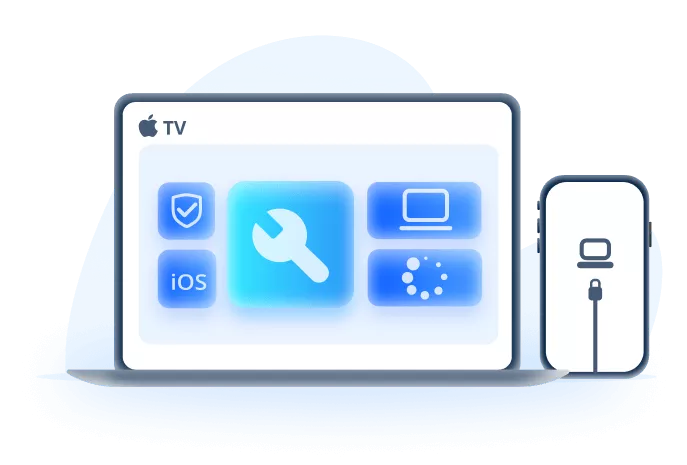
Key Features of iMyFone Fixppo:
- Repair Without Losing Data: Fix unable to install update, iPhone stuck on verifying update and other issues without data loss.
- High Compatibility: Supports all iPhone models and the latest iOS versions, including iOS 27.
- Automatic iOS Update: It can install the latest iOS version on your iPhone automatically while fixing the update issue.
- No Technical Skills Required: Simple interface makes it easy for anyone to repair their devices right at home.
- Secure and Private: Repairs your device without unauthorized access, 100% safe to use.
- Fast Repair Process: Complete the repair in just a few clicks and within minutes.
- Prevent Future Update Stuck Issues: It can prevent other update issues, such as iPhone stuck on preparing update, iPhone stuck on update requested...
After introducing some of its key features, let's see how Fixppo can fix this unable to install update iOS 27 issue with a few clicks.
Step 1: Download and install iMyFone Fixppo on your Win or Mac. Launch it, and from the home screen, click on Start Repair to begin.

Step 2: Select Standard Mode from the two available options. This mode is designed to fix the update issue without causing any data loss on your iPhone.

Step 3: Fixppo will automatically recognize your device model and display the compatible iOS version available for download. Simply click the Download button to start downloading the iOS update file.
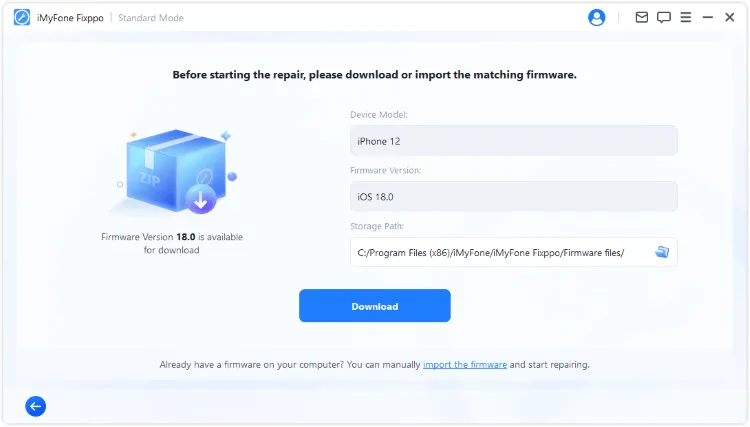
Step 4: After the firmware finishes downloading, click Start Standard Repair to allow Fixppo to use the downloaded firmware file to resolve the iOS update issue and update iOS to the latest version.
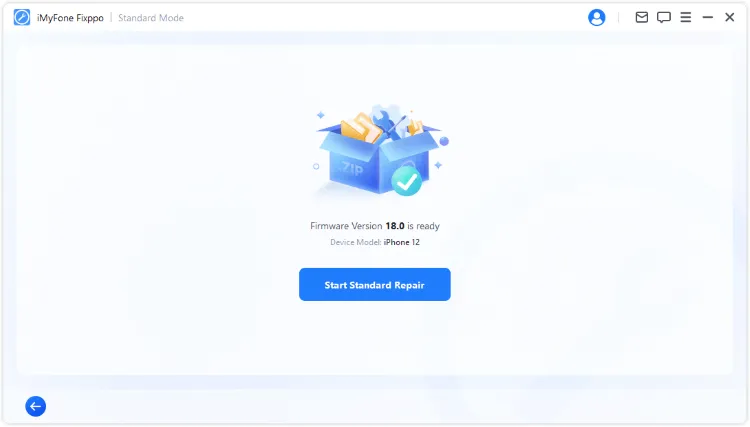
The iPhone will be fixed within 10 minutes. Later, it will restart and you can check the system version from Settings, which will show that your iPhone is updated to the latest version of iOS! Fixppo can not only fix your device but also update your iOS, why not give it a try?

7 Install iOS Update via iTunes on PC/Mac
iTunes can be used to update/restore/back up your device. When there is an error occurred installing iOS 27 that stops you from getting the iOS update, iTunes can help.
But please back up your device first before updating iPhone with iTunes, as it may cause you data loss to an extent.
Step 1: Open iTunes on your PC/Mac and then connect your iPhone to PC/Mac with a USB cable (If iTunes is not in the latest version, please update it first).
Step 2: After clicking on your device, tap Summary and then on Check for Update.

Step 3: Click on Download and Update in the next step. Enter the passcode of your iPhone to proceed.

Tips
If you're using Mac in macOS 10.15 Catalina or higher, you should use Finder to update iOS. The update process is quite the same as iTunes.
FAQs About Unable to Install Update
1 Why does iOS say the update is temporarily unavailable?
It can happen when Apple servers are busy, the build is not available for your device, or the update check cannot complete. Wait, switch Wi-Fi, and retry before deleting anything.
2 Why is my iPhone unable to install update after download?
The downloaded file may be damaged, storage may be too low, or the iPhone may fail a final server check. Delete and re-download the update if Settings still opens.
Conclusion
This article has introduced 7 methods on how to fix when your iPhone unable to install update iOS 27. Hope they can be helpful and make you easier to enjoy the latest version of iOS.
Whenever the problem happens, you have our article with solutions and this practical iOS system repair tool - iMyFone Fixppo, which can easily update your iPhone to the latest version of iOS while solving this iOS update issue. Feel free to try it out!


Melvin Cooper has over 10 years of experience in the technology industry and is an expert at providing tips and handy solutions to Apple and Android users. Dedicated to helping millions of users improve their experience with mobile devices, he has maintained an impressive record of solving problems.
-
Fix iPhone Stuck on Update Requested [iOS 27 Supported]
iPhone stuck on update requested? Learn why it happens and discover 8 proven solutions to get your iOS update back on normal without data loss.
3 mins read -
[2025 New] How to Stop iOS 17/18/26 Update in Progress?
How to stop iOS 17/18/26 update in progress when you feel like staying in the current iOS version? Here's how to do it via 4 methods.
3 mins read -
5 Ways for iOS 26 Beta Download [Developer & Public Beta]
How to get iOS 26 beta? Whether you want to download iOS 26 developer or public beta, you can find the suitable methods with our guide. 5 Ways here!
3 mins read -
17 Important Facebook Statistics You Should Know in 2025
Do you want to know some up-to-date Facebook statistics? We break down 17 must-know Facebook stats about demographics, engagement rate and more.
3 mins read -
[2026 Full Guide] All About iOS Update Issues and Solutions
Have you encountered different problems during or after iOS update? This article focuses on all iOS update issues and solutions. Hope you can learn from it.
5 mins read -
[Full Guide] 50+ iOS 18 Bugs and Fixes You Should Know 2025
What are some known iOS 18 bugs? Read on this article to learn everything about iOS 18 bugs and fixes.
5 mins read
Was this page helpful?
Thanks for your rating
Rated successfully!
You have already rated this article, please do not repeat scoring!