

















 Shop
Shop
Does iTunes Back Up Deleted WhatsApp Messages?
Category: iOS Data Recovery

4 mins read
Does iTunes back up deleted WhatsApp messages? Not if the messages were already deleted before the backup was created. A Finder, Apple Devices, or iTunes backup records eligible iPhone app data at the time of that backup; it is not a separate archive of conversations that had already disappeared.
If an older computer backup was made while the WhatsApp chats still existed, restoring that complete iPhone backup may return the earlier app state. WhatsApp's own supported iPhone chat-history restore, however, is based on a WhatsApp iCloud backup.


Quick Answer
An iTunes or computer backup can contain WhatsApp app data that existed when the backup was made. It cannot retroactively include a chat deleted before that backup. Check WhatsApp > Settings > Chats > Chat Backup first. Before restoring a whole iPhone, verify the backup date and protect current data.
In this article:
- Part 1: Understand What an iTunes Backup Can Contain
- Part 2: Check the WhatsApp Backup Date
- Part 3: Restore WhatsApp from iCloud
- Part 4: Restore an Older Computer Backup
- Part 5: Preview Backup Data with D-Back
- Part 6: FAQs
Does iTunes Back Up WhatsApp Messages?
A complete iPhone computer backup may preserve supported WhatsApp app data that is present at the moment the backup runs. The decisive factor is timing: the backup must predate the deletion. A backup created after the chat disappeared records the newer state with that chat already missing.
| Backup or copy | Can it help? | Important condition |
|---|---|---|
| WhatsApp iCloud chat backup | Yes, through WhatsApp's official restore | Backup predates deletion and uses the same number and Apple Account |
| Finder, Apple Devices, or iTunes backup | Possibly through a full-device restore | WhatsApp data existed in that backup |
| Backup made after deletion | No for the deleted chat | It preserves the already-deleted state |
| Exported chat or recipient's copy | Useful as a readable record | It normally cannot be imported as a live WhatsApp thread |

Do Not Create a New WhatsApp Backup Yet
If the only available WhatsApp iCloud backup may contain the deleted messages, avoid manually creating a new backup until you record its date and size. A newer backup can replace the older recoverable state.
First: Check the WhatsApp Chat Backup Date
- Open WhatsApp on the iPhone.
- Tap Settings > Chats > Chat Backup.
- Record the date, time, and size of the latest backup.
- Confirm that the backup was created before the messages were deleted.
- Check whether end-to-end encrypted backup is enabled and make sure you know its password or key.
WhatsApp's current iPhone chat-history restore instructions require the same phone number and Apple Account used to create the backup. A backup cannot recover messages sent or received after its timestamp.
If no useful backup exists, review the realistic methods in the guide to recover WhatsApp data on iPhone.
Method 1: Restore WhatsApp from Its iCloud Chat Backup
This is WhatsApp's official iPhone recovery route. It replaces the current WhatsApp chat database with the selected iCloud backup state.
- Confirm that the backup predates deletion.
- Delete and reinstall WhatsApp from the App Store.
- Open WhatsApp and verify the same phone number.
- Sign in to the same Apple Account if requested.
- Tap Restore Chat History.
- Keep the iPhone connected to power and a stable network while messages and media return.
Messages created after the backup may be lost from the restored WhatsApp state. Export or capture important current chats first. If the backup is end-to-end encrypted, WhatsApp cannot restore it without the password or 64-digit key.
Method 2: Restore an Older Finder, Apple Devices, or iTunes Backup
Use this route only when a computer backup was made before deletion and you accept a full iPhone rollback. Current Macs use Finder, current Windows systems use Apple Devices, and older systems may still use iTunes.
- Connect the iPhone to the computer that stores the backup.
- Open Finder, Apple Devices, or iTunes and select the iPhone.
- Choose Restore Backup.
- Select the backup by date and enter the encryption password if needed.
- Keep the iPhone connected until it restarts and finishes syncing.
- Open WhatsApp only after the restore is complete and check the available chat state.
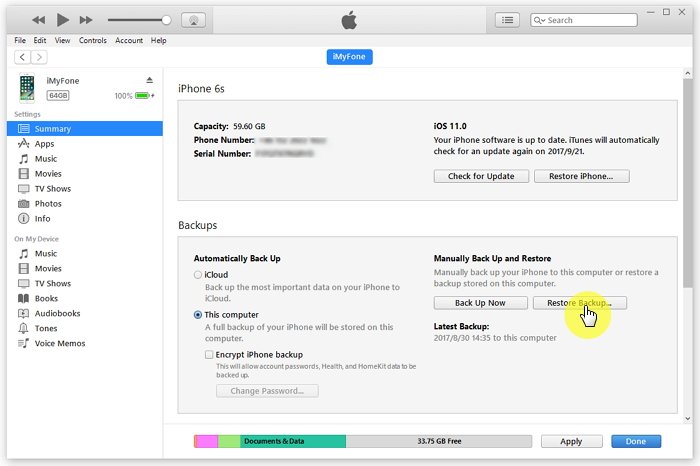
Whole-Device Restore Warning
This method replaces the current iPhone state with the older backup. New photos, messages, app data, and settings that are not independently synchronized or backed up may be lost. Make a current backup first, but do not confuse that new safety backup with the older recovery source.
For WhatsApp chats older than the current backup, compare these methods to recover older WhatsApp messages.
Method 3: Preview WhatsApp Data in a Backup with D-Back
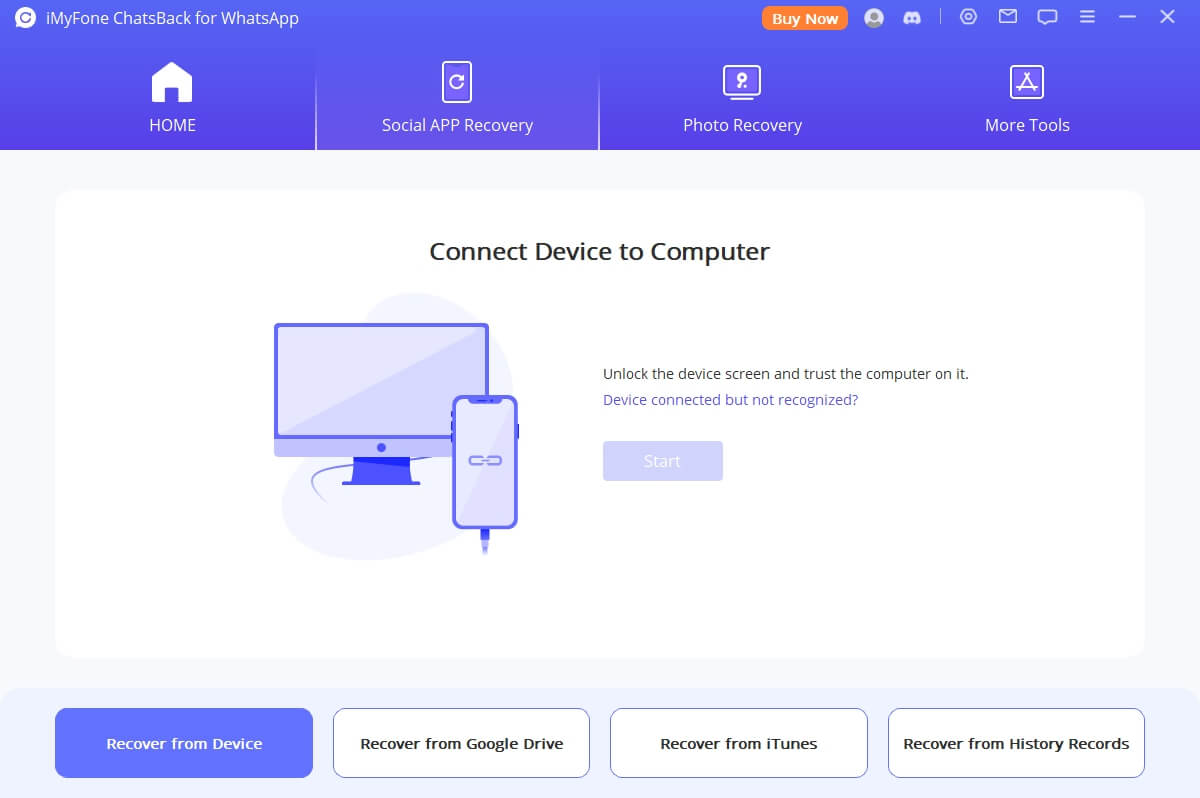
If you do not want to restore an entire iPhone merely to test a backup, iMyFone D-Back for iPhone can inspect supported device and backup sources, preview available WhatsApp data, and export selected results to a computer.

Useful for Checking WhatsApp Backups:
- Inspect supported iPhone and computer-backup sources.
- Preview available chats and attachments before export.
- Recover selected readable records to a computer.
- Avoid an immediate full-device rollback just to inspect one backup.
Step 1: Open D-Back and select the device or computer-backup recovery source.
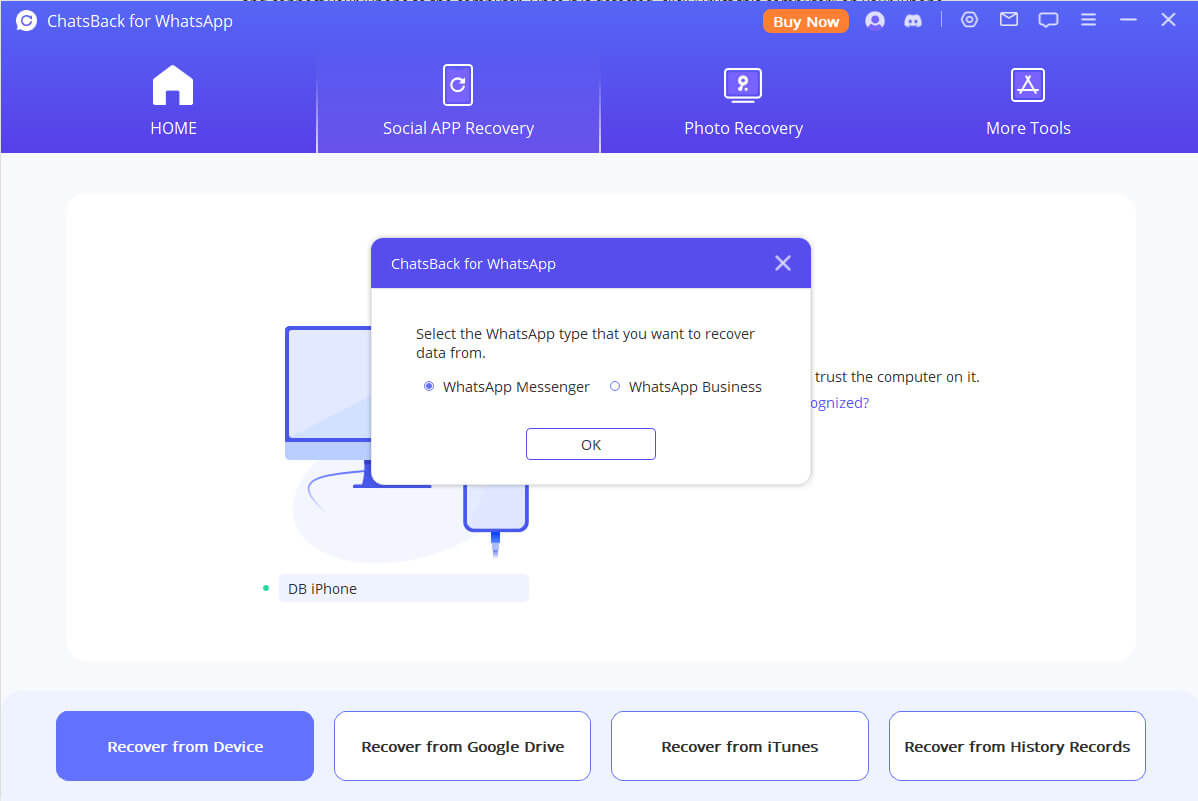
Step 2: Choose WhatsApp and attachments, then scan the selected source.
Step 3: Preview the detected chats and export selected available items to the computer.
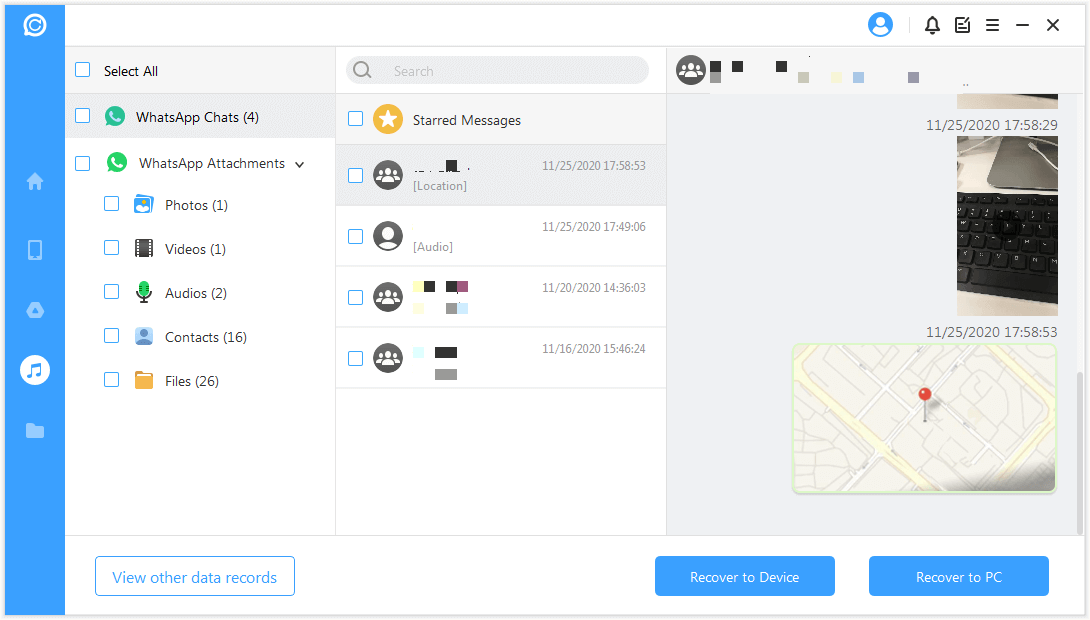
A scan shows what the selected source currently exposes; it does not guarantee recovery of a chat that was permanently removed before every available backup. For an iCloud-oriented workflow, see how to inspect backup data without resetting an iPhone.
FAQs about iTunes and Deleted WhatsApp Messages
Does an encrypted iTunes backup include more WhatsApp data?
Encrypted computer backups include additional protected categories such as saved passwords and Health data, but encryption does not make an already deleted WhatsApp chat reappear. The relevant backup still must have been created while the chat existed.
Can I restore only WhatsApp from an iTunes backup?
Apple's standard Restore Backup operation restores the complete iPhone snapshot, not one app. A compatible backup-viewing tool may let you preview and export available WhatsApp records without first replacing the entire device state.
Will a new iTunes backup overwrite the old backup?
It can update the existing backup set for that device. Before making another backup, use Finder or Apple Devices to manage or archive important older backups where supported, and record their dates. Preserve the pre-deletion copy separately.
Can the other person send the deleted WhatsApp messages back?
Yes, the other participant can forward messages, resend attachments, take screenshots, or export the chat. This creates a readable copy but normally does not reconstruct the original live thread inside your WhatsApp account.
Conclusion
iTunes does not back up WhatsApp messages that were already deleted. An older computer backup may contain the earlier app state, while WhatsApp's supported chat restore uses its iCloud backup. Verify dates before changing anything, protect current chats, and use D-Back for iPhone when you need to preview available backup data before a full restore.


(Click to rate this post)
Generally rated 5 (256 participated)

Rated successfully!

You have already rated this article, please do not repeat scoring!